Microsoft Entra Private Access - Simply Explained

Microsoft Entra Private Access - Simply Explained

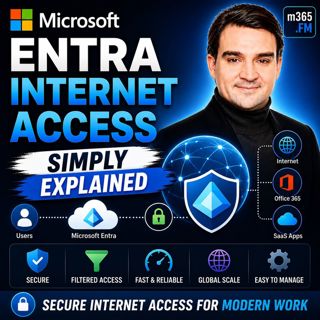
Welcome to another episode of Knowledge Nuggets with Mirko Peters. Today we're exploring Microsoft Entra Internet Access, Microsoft's modern cloud-native approach to secure internet connectivity that replaces traditional VPNs with identity-driven Zero Trust security. For decades, organizations relied on VPNs to give remote employees access to corporate resources. That model worked when applications lived inside company data centers and employees worked primarily from the office. Today's reality is completely different. Employees work from home, coffee shops, hotels, and airports while applications are spread across Microsoft 365, SaaS platforms, and cloud services. The traditional idea of "connecting to the corporate network" no longer fits the modern workplace. Microsoft Entra Internet Access addresses this challenge by shifting security away from network trust and toward identity trust. Instead of giving users broad access simply because they're connected through a VPN, every internet request is evaluated based on the user's identity, device health, location, and security posture. In this episode, we'll explore how Entra Internet Access works, its role within Microsoft Global Secure Access, its integration with Conditional Access, and why it's becoming a key component of Microsoft's Zero Trust strategy.

WHY TRADITIONAL VPNS ARE NO LONGER ENOUGH
Traditional VPNs were designed for a world where applications, users, and data all existed within the corporate network. When employees connected remotely, the VPN simply extended the corporate network to their device. While this model worked for many years, it introduces significant problems in today's cloud-first world. Once connected, users often receive broad access to internal resources far beyond what they actually need. File servers, databases, legacy applications, and internal systems become reachable simply because the user is "inside" the network. VPNs also generate ongoing operational challenges. Connection failures, certificate issues, client updates, forgotten credentials, and performance problems generate a continuous stream of help desk tickets for IT departments. More importantly, VPNs generally trust the connection after authentication. Once users successfully authenticate, they're typically trusted throughout the session regardless of changing device health or security risks. Modern cybersecurity requires continuous verification rather than one-time authentication. This shift forms the foundation of Microsoft's Zero Trust security model.

FROM NETWORK TRUST TO IDENTITY TRUST
Modern security no longer focuses on protecting a network perimeter. Instead, it focuses on protecting identities. This philosophy is known as Zero Trust, built around one simple principle: Never trust. Always verify. Every request is evaluated independently using multiple security signals. Microsoft Entra ID becomes the central identity platform that continuously evaluates:
  • User identity
  • Device compliance
  • Geographic location
  • Sign-in risk
  • User risk
  • Authentication strength
  • Conditional Access policies
Rather than assuming trust because someone is connected through a VPN, every request is evaluated in real time. Whether users connect from the corporate office, home, or public Wi-Fi becomes far less important than proving they are who they claim to be while using a trusted device. Identity replaces the network as the primary security boundary.

WHAT IS MICROSOFT ENTRA INTERNET ACCESS?
Microsoft Entra Internet Access is Microsoft's cloud-native Secure Web Gateway (SWG). Instead of routing traffic through traditional VPN appliances, internet traffic passes through Microsoft's Global Secure Access platform where it can be authenticated, inspected, filtered, and authorized. Every request is evaluated using identity-driven security policies before reaching its destination. Entra Internet Access is one of two major services within Microsoft Global Secure Access. The second service is Microsoft Entra Private Access, which securely connects users to private on-premises applications without requiring a traditional VPN. Together they provide secure connectivity for both cloud services and private business applications. Unlike traditional VPNs that primarily trust network connectivity, Entra Internet Access evaluates the user, device, and current security posture before granting access to internet resources. Because traffic travels across Microsoft's global backbone spanning dozens of regions and hundreds of edge locations worldwide, users often benefit from improved performance alongside stronger security.

UNDERSTANDING THE THREE TRAFFIC PROFILES
Microsoft Global Secure Access organizes connectivity using three different traffic forwarding profiles. The Microsoft Traffic Profile protects Microsoft 365 services including Exchange Online, SharePoint, Teams, and OneDrive. This profile is included with Microsoft Entra ID P1 and Microsoft 365 Business Premium licensing. The Internet Access Profile extends protection to general web browsing and third-party SaaS applications such as Salesforce, Slack, or other internet services. This profile requires additional licensing or is included as part of Microsoft Entra Suite. The Private Access Profile securely connects users to internal applications, file shares, databases, and legacy systems without requiring a traditional VPN. This profile effectively replaces VPN access for private corporate resources. A lightweight Global Secure Access client installed on user devices automatically directs traffic into the appropriate profile without requiring users to manually establish VPN connections. The result is seamless connectivity with significantly improved user experience.

CONDITIONAL ACCESS BECOMES EVEN MORE POWERFUL
One of the biggest advantages of Entra Internet Access is its deep integration with Microsoft Conditional Access. Traditionally, Conditional Access policies protected Microsoft cloud applications. With Entra Internet Access, those policies can now extend to internet traffic itself. Organizations can require the Global Secure Access client before allowing access to Microsoft 365 services. If the client isn't running, access is denied immediately. This provides powerful protection against modern attack techniques including Adversary-in-the-Middle (AiTM) attacks. Even if attackers successfully steal authentication tokens, they still cannot satisfy Conditional Access policies requiring traffic to originate through the trusted Global Secure Access client. Organizations can further require:
  • Multi-factor authentication
  • Device compliance
  • Low user risk
  • Trusted network connectivity
  • Specific authentication strengths
These policies dramatically strengthen Zero Trust security while remaining centrally managed through Microsoft Entra ID.

WEB FILTERING AND THREAT PROTECTION
Entra Internet Access goes far beyond identity verification. It also introduces enterprise-grade web protection previously delivered through dedicated secure web gateway appliances. Organizations can create category-based web filtering policies that block websites associated with gambling, adult content, hacking tools, social media, AI services, or any other predefined categories. Policies can differ between departments, allowing marketing teams access to social media while blocking it for finance or operations. Administrators can also allow or block specific domains using fully qualified domain names and wildcard rules. Another major capability is TLS inspection. Encrypted internet traffic is decrypted, inspected for threats, and securely re-encrypted before reaching its destination. This enables organizations to detect malware, phishing attempts, malicious downloads, and data exfiltration hidden inside encrypted HTTPS traffic. Additional capabilities include:
  • Universal Tenant Restrictions
  • Shadow AI discovery
  • SaaS application visibility
  • AI application monitoring
  • Data loss prevention support
Importantly, these protections occur at the network layer rather than within individual browsers, making them consistent across browsers and desktop applications alike.

Become a supporter of this podcast: https://www.spreaker.com/podcast/m365-fm-modern-work-security-and-productivity-with-microsoft-365--6704921/support.

Tämä jakso on lisätty Podme-palveluun avoimen RSS-syötteen kautta eikä se ole Podmen omaa tuotantoa. Siksi jakso saattaa sisältää mainontaa.

Jaksot(855)

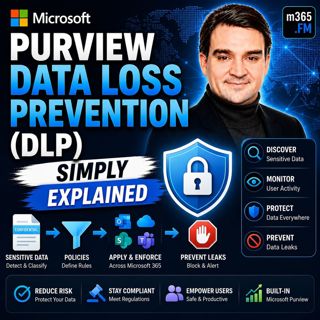
Microsoft Purview Data Loss Prevention (DLP) - Simply Explained

Microsoft Purview Data Loss Prevention (DLP) - Simply Explained

Welcome to another episode of Knowledge Nuggets with Mirko Peters. Today we're exploring Microsoft Purview Data Loss Prevention (DLP), one of the most important security capabilities in Microsoft 365 ...

24 Heinä 0s

Microsoft Graph Delta Queries - Simply Explained

Microsoft Graph Delta Queries - Simply Explained

Welcome to another episode of Knowledge Nuggets with Mirko Peters. Today we're exploring Microsoft Graph Delta Queries, one of the most powerful features for building efficient synchronization solutio...

24 Heinä 0s

Responsible AI Is Good Business — Featuring Wiebke Apitzsch

Responsible AI Is Good Business — Featuring Wiebke Apitzsch

Artificial intelligence is transforming every industry, but successful AI adoption requires far more than deploying the latest models or building autonomous agents. In this episode of M365.fm, Mirko P...

24 Heinä 0s

Microsoft Graph Webhooks - Simply Explained

Microsoft Graph Webhooks - Simply Explained

Welcome to another episode of Knowledge Nuggets with Mirko Peters. Today we're exploring Microsoft Graph Webhooks, one of the core building blocks for creating modern, event-driven Microsoft 365 appli...

24 Heinä 0s

Microsoft Graph Change Notifications - Simply Explained

Microsoft Graph Change Notifications - Simply Explained

Welcome to another episode of Knowledge Nuggets with Mirko Peters. Today we're exploring Microsoft Graph Change Notifications, one of the most important capabilities for building modern, event-driven ...

24 Heinä 0s

Microsoft Cloud for Sustainability - Simply Explained

Microsoft Cloud for Sustainability - Simply Explained

Welcome to another episode of Knowledge Nuggets with Mirko Peters. Today we're exploring Microsoft Cloud for Sustainability, Microsoft's end-to-end platform for measuring, managing, and reducing an or...

24 Heinä 0s

Microsoft Partner Center - Simply Explained

Microsoft Partner Center - Simply Explained

Welcome to another episode of Knowledge Nuggets with Mirko Peters. Today we're exploring Microsoft Partner Center, the central platform every Microsoft partner uses to manage their relationship with M...

24 Heinä 0s

Suosittua kategoriassa Politiikka ja uutiset

aikalisa
uutiscast
ootsa-kuullut-tasta-2
rss-ootsa-kuullut-tasta
rss-podme-livebox
rss-seksicast
rss-vaalirankkurit-podcast
otetaan-yhdet
politiikan-puskaradio
aihe
rikosmyytit
rss-kovin-paikka
rss-kaikki-uusiksi
tervo-halme
rss-asiastudio
rss-girls-finish-f1rst
rss-varsinaista-puhetta