6 Tips on Assembling an Arduino Shield (Or any Electronics Kit)

6 Tips on Assembling an Arduino Shield (Or any Electronics Kit)

In this video we will be talking about some key points to keep in mind when assembling an Arduino shield from a kit. Many of these tips will apply equally well to any type of electronics kit you are assembling.

So you just bought an awesome Arduino shield - it's going fly you to the moon and back, but before you start using it you have to do some basic assembly.

Here are six tips to help you get the assembly done right the first time.

Read the Directions:

The first advice is painfully obviously, but still worth mentioning - read the directions! When all you have to do is solder on some pin headers and a couple LEDs, it's tempting to ignore the need for directions and just go at. You're a genius right - who needs directions?

As J.R.R. Tolkien said...

"Shortcuts make for long delays".

Even on simple assemblies it pays to take the time to read through the directions. Most companies keep the directions online – they are really only a search away. I'm telling you it's worth it!

Consider Where you Will be Assembling the Board:

You may not have a dedicated space for your electronics addiction. There have been many times when I find myself soldering stuff on my kitchen table.

If you don't have a dedicated space, a couple things you will want to consider are:

• Having good lighting, so you can see what you are up to
• Access to a wall outlet for your soldering iron – you want the cord to have some maneuver room
• A floor without shag carpet, as they tend to be repositories for small electronics parts (the smallest parts are always the first to fall)

You can't always have the best spot, but you can make the best of what you have available.

Get Your Tools Together

Good instruction manuals will let you know what tools you need for the job.
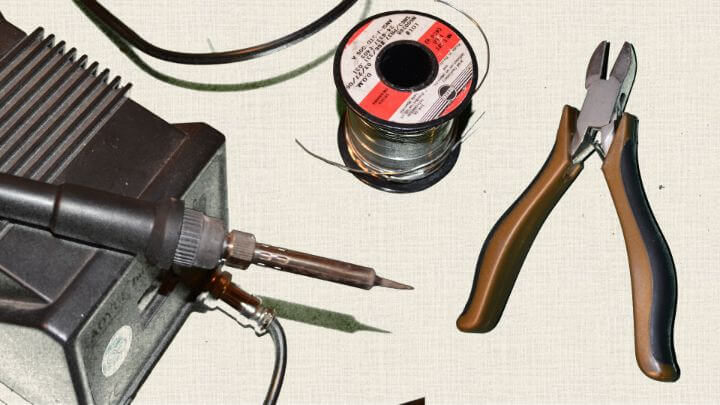
Generally speaking, the essential tools are:

• soldering iron
• solder
• wire cutters

Some other tools that are not necessary but make life way easier are:

• Needle nose: pliers for grabbing tiny parts
• Helping hand: these help not only holding parts when soldering, but also provide the magnifying glass which is good for checking solder joints
• Solder wick for undoing your mistakes
• A pair of safety glasses is also a good idea.

You might be thinking – ah, heck with safety glasses…

It's easy to write them off when assembling boards. What I have done is get a pair that is comfortable and that I keep clean - this makes using them less a hassle. It's a small precaution to take from getting a piece of tiny sharp metal in your eye.

Inventory All the Parts

For whatever reason, inventorying all the parts always seemed like a waste of time to me, but now it is something I make sure to do.

Two big reasons I do this. Many of the boards I get are from Kickstarter campaigns, so the people manufacturing these might be kind of new at the gig, and with all the stuff they have going on, it's very possible they missed a part in the package.

Another reason I like to do the inventory is so I know if I have extras. If I have pieces left over when I finish, then I am usually wondering if I did the assembly correct or not. If you do the inventory, then you can be confident that you assembled it right.

I also separate the components into different jars, or bowls. This helps me quickly find components when I am assembling the shield and prevents the pieces from ending up lost in the carpet.

Check Twice Solder Once

I like solder wick as much as the next guy, but I would prefer not use it. It is really worth your time to double check part locations before you start soldering.

I learned my lesson when I soldered a 24 pin connecter on the wrong side on a board. Now I always check a diagram or the directions at least twice before pulling out the solder.

After I solder, I also make it a point to look over the solder joints. I am amazed at how much my soldering joints can stink, even when I feel like I had done a great job (this is when a helping hand or magnifying glass is good to have).

Use an Arduino Board to Help Align the Pin Headers.

One thing all Arduino Shields have in common are pin headers. These are the metal rows of pins that go on the bottom of the shield and plug into the Arduino stackable headers.

If you don't get the pin headers aligned correctly then your shield may not fit well, or may not fit at all on top of the Arduino.

One trick to get the alignment right is to use an Arduino to hold the pin headers in the correct position when you solder them to the bottom of the shield. To do this, simply insert the headers how they would go into the Arduino, place the shield on top, and then do your soldering. It works like a charm.

Troubleshooting the Assembly

Now that your Arduino shield is fully assembled, it's time to get that puppy running.

Hopefully the shield came with some type of test sketch that you can load and it verifies that everything is up and running correctly. If not, try to find some code that you know works and load it onto the Arduino.

If you start with code that you can verify works (or at least works for others), it can be easier to troubleshoot any issues you might encounter. I know how demoralizing it can be to load your first sketch and getting nothing better errors when you press the verify button.

Here is a tidbit of moral support - there is a learning curve to everything - no matter how easy it is "supposed" to be.

In fact, some of my favorite shields took me a while to understand how to use. So try not to get frustrated if your sketch isn't working instantly. In the end, a little bit of determination goes a long way.

Do you have any tips for building Arduino shields or electronics kits in general? I would love to hear about them in the comments.

Jaksot(61)

How to Use and Understand the Arduino Reference

How to Use and Understand the Arduino Reference

So you just opened up your fancy new gadget - maybe an awesome DSLR camera, or the newest gaming system, or maybe a new Blu-ray player. As you gladly tear away the packaging - you notice a small book...

12 Huhti 201712min

Using Red-Green-Blue (RGB) LEDs with Arduino (Common Cathode Type)

Using Red-Green-Blue (RGB) LEDs with Arduino (Common Cathode Type)

In this tutorial we describe using RGB LEDs of the Common Cathode Type.  We will describe setting up the circuit, talk about the LED and discuss the code used to adjust the hue.

11 Huhti 201714min

Using Random Numbers with Arduino

Using Random Numbers with Arduino

This video tutorial talks about using the random() and randomSeed() functions with Arduino.  It is pretty straight forward, but there are some intricacies worth noting. Creating truly random numbers i...

10 Huhti 201713min

Kit-on-a-Shield for Arduino

Kit-on-a-Shield for Arduino

Ever ever spent too much time searching for a 220 ohm resistor or just one more jumper wire? Are you sure you had that extra LED, LDR, [Fill in the blank], but have no idea where it went? Do you jus...

9 Huhti 20171min

How to Make One Button Have the Functionality of Two or More with Arduino

How to Make One Button Have the Functionality of Two or More with Arduino

Do you have an application where you want multiple buttons for different user inputs? Maybe you have a timer and you want one button for minutes and another for hours. But there is a problem – you on...

8 Huhti 201715min

Understanding HIGH and LOW Arduino Pin States

Understanding HIGH and LOW Arduino Pin States

If you are just getting started with Arduino, you might be wondering what the heck all this HIGH and LOW stuff everyone is talking about really means. At first I just figured everyone using micro-cont...

7 Huhti 201712min

Floating Pins, Pull-Up Resistors and Arduino

Floating Pins, Pull-Up Resistors and Arduino

Floating Pins on Arduino have always been a bit of mystery to me.  It just never made much sense.  I did this video more for my own sake - just to concrete it in my brain.  I hope it can add some soli...

6 Huhti 201710min

The MOST guaranteed way to NOT buy a Fake Arduino  (The Story of Pizza-Duino)

The MOST guaranteed way to NOT buy a Fake Arduino (The Story of Pizza-Duino)

Let's not be duped by people trying to sell us authentic Arduino's that are counterfeit.  This video will show you the one way to be sure you get the real deal, and five methods of telling if you boug...

5 Huhti 20175min

Suosittua kategoriassa Koulutus

rss-murhan-anatomia
voi-hyvin-meditaatiot-2
psykopodiaa-podcast
rss-narsisti
adhd-podi
rss-liian-kuuma-peruna
aamukahvilla
rss-rahamania
rss-eron-alkemiaa
kesken
rss-duodecim-lehti
rss-koira-haudattuna
rahapuhetta
rss-tietoinen-yhteys-podcast-2
rss-niinku-asia-on
rss-uskonto-on-tylsaa
rss-onks-ok
rss-turun-yliopisto
rss-vapaudu-voimaasi
rss-finnish-daily-dialogues