An Easy Way to Learn I2C, SPI, RTC, ADCs and More with this Awesome Arduino Education Shield

An Easy Way to Learn I2C, SPI, RTC, ADCs and More with this Awesome Arduino Education Shield

In this video we talk about an Arduino shield designed to teach you about shift registers, I2C, SPI, temperature sensors, real time clocks, analog to digital convertors and flash memory chips - all this on one awesome Arduino shield!

Electronics Concepts can be Intimidating

Like any industry or hobby, electronics has its fare share of acronyms.

A couple of the more common ones you might have come across are SPI, I2C, ADC, RTC and YOMAMA.

All these acronyms can be intimidating. It's like this giant lion staring you down.

You can spend a lot of time reading about each of these concepts, buying a bunch of different parts and working up breadboards - this is a great way to learn – it's kind of the common path many hobbyist and professionals have taken alike.

But if you want to grab the lion by the throat - I would like to introduce you to my new favorite Arduino shield. The Rheingold Heavy Education Shield.

It's an Arduino shield designed to teach you about the ins and outs of all these really common electronics concepts (like I2C and SPI) and applying that understanding to hardware (like analog to digital convertors and Flash RAM). It's not just the shield that makes this an education board, it's all of the really thorough documentation and tutorials that accompany the hardware on the Rheingold Heavy website.

Have Fun Learning Electronics

If you are going to learn electronics, you might as well have fun doing it. That's one great thing about the Rheingold Heavy tutorials - they are fun - the author has a great sense of humor and keeps things real.

He does a great job at demystifying electronics concepts that on the outside seem extremely complex, but dissected piece by piece can be made elementary.

I would say my favorite part about the tutorials is the depth and detail they cover.

I think this line from one of the introductory tutorials captures the style of the author…

...I don't like "just making it work" — I want to know why it works the way it does.

Hardware and Education Unite

The real magic happens when you have the Education Shield and start working through the tutorials. The lessons on the Rheingold Heavy website are all designed step-by-step to walk you through understanding in detail the hardware on the shield.

The lessons are a good length, focus on just a couple concepts at a time and get into the nuts and bolts.

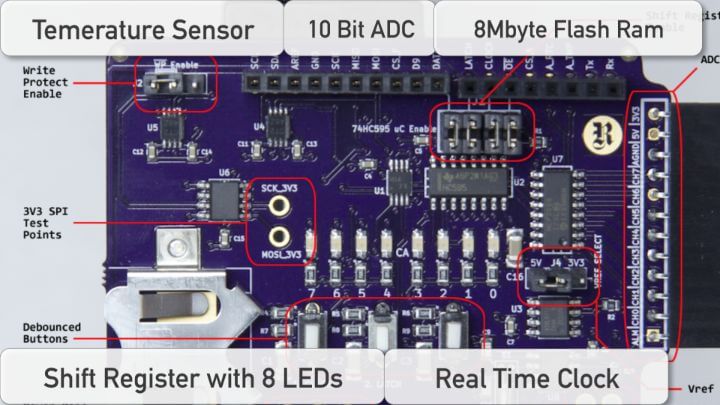
The Rheingold Heavy Education Shield itself is jam packed with components.

It's got a shift register hooked up to 8 surface mount LEDs for learning about shift registers, a real time clock, a temperature sensor, a 10 bit analog to digital convertor, and 8Mbytes of Flash RAM. All this hardware you learn to use with either I2C protocol or SPI!

It's like an electronics learning laboratory on a single Arduino shield.

If you already have a handle on some of these concepts, and you don't think you need the whole shield, you can purchase breakout boards for each separate component and all the documentation on the website works equally well for those.

I know I've said it once, but it deserves saying again - the tutorials are written in a fun and relaxing tone - with tons of diagrams, questions along the way to make sure you're on track and Arduino code to help experiment with the shield and concepts.

History of the Rheingold Heavy Education Shield

The brainchild of this education shield is Dan Hienzsch. In 2014 he ran a successful Kickstarter campaign that brought these shields to fruition. After successfully fulfilling all his Kickstarter backers (and on time!) he has set up shop and is now churning out these education shields all over the world.

My Unabashed Endorsement

I am just little biased towards this education shield - I know Dan - he's a great guy and very passionate about what he does.

After buying the shield and the breakout boards and working through the tutorials on the website I have learned a ton!

The best part is how much fun it has been to work through the material.

I love learning and if I can have a single "aha!" kind of moment everyday, then I sleep at night pretty good. My experience with the Rheingold Heavy Education Shield has brought me these moments left after right.

Needless to say I highly recommend this Arduino shield to any body who wants to get a solid and detailed grasp of concepts like SPI and I2C, or about using real time clocks, analog to digital convertors, temperature sensors, shift sensor and a whole lot more.

With all this education packed into Rheingold Heavy Education Shield, backed-up with really enjoyable tutorials, you can't go wrong.

Jaksot(61)

How to read voltages with analogRead()

How to read voltages with analogRead()

In the last lesson you learned about using the analogRead() function to collect data from a sensor connected to one of the Arduino analog pins. The range of data we received from the analogRead() func...

12 Maalis 201714min

analogRead() and the Serial Port

analogRead() and the Serial Port

Knowing if something is on or off can be extremely useful, but often you will want to know more. How bright is the light? How fast is the satellite moving? These types of answers are often analog – th...

11 Maalis 201712min

digitalRead() and the Serial Port

digitalRead() and the Serial Port

As simple as it may seem, knowing when something is either on or off can be a great tool for designing something useful. This lesson will answer the following questions: Is a button being pressed? Has...

10 Maalis 201721min

How to Blink an LED with Arduino

How to Blink an LED with Arduino

The first program you usually write when learning a new programming language is called, "Hello World". Its only function is to display the words "Hello World" on the computer monitor. When learning to...

9 Maalis 201714min

Understanding Variables

Understanding Variables

Let's have a discussion about a powerful and semi-confusing programming topic – variables. Arduino code variables are like buckets. You choose what types of stuff you want in the bucket and can change...

8 Maalis 201711min

Understanding Arduino Syntax

Understanding Arduino Syntax

Arduino Code & Syntax Overview As you learned in Module 01, IDE stands for Integrated Development Environment. Pretty fancy sounding, and should make you feel smart any time you use it. The IDE is a t...

7 Maalis 201710min

Arduino IDE and Sketch Overview

Arduino IDE and Sketch Overview

IDE stands for Integrated Development Environment. Pretty fancy sounding, and should make you feel smart anytime you use it. The IDE is a text editor like program that allows you to write computer cod...

6 Maalis 20178min

Download & Install the Arduino IDE

Download & Install the Arduino IDE

One of the absolute best things about the Arduino IDE and platform is how easy it is to get started. The software that is installed on your computer is completely free and designed specifically for ea...

5 Maalis 20175min

Suosittua kategoriassa Koulutus

rss-murhan-anatomia
voi-hyvin-meditaatiot-2
psykopodiaa-podcast
rss-narsisti
adhd-podi
aamukahvilla
rss-liian-kuuma-peruna
rss-eron-alkemiaa
rss-koira-haudattuna
rss-rahamania
rss-tietoinen-yhteys-podcast-2
rahapuhetta
kesken
mielipaivakirja
rss-duodecim-lehti
rss-vapaudu-voimaasi
rss-niinku-asia-on
rss-uskonto-on-tylsaa
rss-onks-ok
rss-turun-yliopisto