
Microsoft Copilot prompting: use iterative, structured prompts instead of chasing the “perfect” one‑shot request

Microsoft Copilot prompting: use iterative, structured prompts instead of chasing the “perfect” one‑shot request

Microsoft Copilot prompting: in this episode of M365.fm, Mirko Peters tears apart the myth of the “perfect prompt” and shows why professionals get better results by iterating in small steps instead of dumping a mega‑prompt into Copilot and praying. He explains how a simple four‑part structure—goal, context, expectations, and sources—beats over‑engineered, 100‑word requests every time, because Copilot works best when each message has one clear destination instead of ten competing instructions.

Mirko then introduces iteration as the engineer’s secret weapon. Instead of asking Copilot for a finished executive brief in one go, he demonstrates a repeatable sequence: first generate a plain‑language summary, then reshape it into an executive style, then extract highlights and action items, and finally adapt the result into an email or slide outline. This layered prompting mirrors how engineers build reliable systems—foundation first, then structure, then detail—while giving you natural checkpoints to verify facts and correct errors as you go.

Context becomes the third pillar. Mirko shows that most mediocre outputs come from context‑free prompts that ignore a company’s templates, vocabulary, and processes, forcing Copilot to fall back to generic business language. By feeding in real examples—past strategies, local naming conventions, house tone—and letting Copilot imitate and adapt them, you get drafts that sound like your organization rather than stock corporate boilerplate, without needing to craft poetic instructions.

Throughout the episode, Copilot is treated less like a magical essay machine and more like a capable intern. Mirko stresses Microsoft’s own guidance: expect back‑and‑forth, always review and verify outputs, and use conversation—not one‑shot prompts—as your default pattern. The payoff is practical: fewer rewrites, outputs aligned with your real context, and a reusable prompting method you can apply across meetings, reports, and executive communication.

WHAT YOU WILL LEARN
  • Why the “perfect one‑shot prompt” is a myth and how it wastes time.
  • How to use a simple four‑part prompt structure: goal, context, expectations, and sources.
  • How iterative prompting (summary → format → highlights → communication) yields better business results.
  • How to feed Copilot real organizational context so outputs match your templates and tone.
  • How to treat Copilot as a collaborative assistant you guide and verify, not an oracle.
THE CORE INSIGHT

Copilot is not a vending machine where you insert the “right” prompt and get perfection. It is a conversation partner that shines when you give it clear goals, real context, and iterative guidance—turning prompting from superstition into a practical, repeatable workflow.

WHO THIS EPISODE IS FOR

This episode is ideal for experienced Microsoft 365 Copilot users, knowledge workers, and leaders who already use Copilot daily but suspect they are leaving quality—and speed—on the table. It is especially valuable if you are tired of bloated prompts, inconsistent results, or training material that treats prompting like mystical art instead of a simple, adaptable method.

ABOUT THE HOST

Mirko Peters is a Microsoft 365 and productivity consultant focused on making Copilot a dependable part of everyday work, not a novelty. Through M365.fm, he shares practical prompting patterns, governance insight, and real‑world examples that help organizations turn AI from a buzzword into a disciplined, high‑leverage tool.


Become a supporter of this podcast: https://www.spreaker.com/podcast/m365-fm-modern-work-security-and-productivity-with-microsoft-365--6704921/support.

Denne episoden er hentet fra en åpen RSS-feed og er ikke publisert av Podme. Den kan derfor inneholde annonser.

Episoder(801)

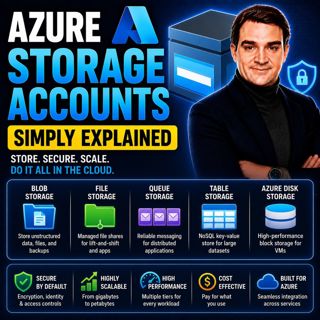
Azure Storage Accounts - Simply Explained

Azure Storage Accounts - Simply Explained

An Azure Storage Account is the foundation of Microsoft's cloud storage platform and acts as a single container that brings together multiple storage services under one roof. Rather than creating sepa...

18 Jul 13min

Azure DDoS Protection - Simply Explained

Azure DDoS Protection - Simply Explained

Azure DDoS Protection is Microsoft's managed service for defending internet-facing applications against Distributed Denial-of-Service (DDoS) attacks. These attacks attempt to overwhelm websites, APIs,...

18 Jul 16min

Azure Network Security Groups - Simply Explained

Azure Network Security Groups - Simply Explained

Azure DDoS Protection is Microsoft's managed service for defending internet-facing applications against Distributed Denial-of-Service (DDoS) attacks. These attacks attempt to overwhelm websites, APIs,...

18 Jul 14min

Azure Virtual Network - Simply Explained

Azure Virtual Network - Simply Explained

An Azure Virtual Network (VNet) is your own private network inside Microsoft Azure. It provides the secure foundation for virtually every cloud workload you deploy, including virtual machines, databas...

18 Jul 17min

Azure Private Link - Simply Explained

Azure Private Link - Simply Explained

Azure Private Link is Microsoft's networking service that enables secure, private connectivity between your Azure Virtual Network and Azure Platform-as-a-Service (PaaS) resources such as Azure Storage...

18 Jul 16min
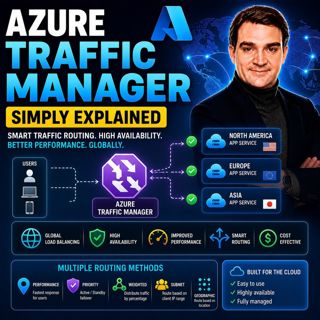
Azure Traffic Manager - Simply Explained

Azure Traffic Manager - Simply Explained

Azure Traffic Manager is Microsoft's global DNS-based traffic distribution service that directs users to the most appropriate application endpoint anywhere in the world. Instead of sending every user ...

18 Jul 16min

Azure DNS - Simply Explained

Azure DNS - Simply Explained

Azure DNS is Microsoft's fully managed Domain Name System (DNS) hosting service that translates human-friendly domain names like contoso.com into the IP addresses computers use to communicate. Instead...

18 Jul 15min
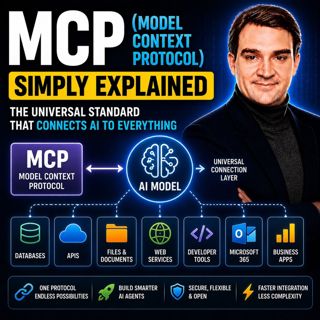
MCP (Model Context Protocol) - Simply Explained

MCP (Model Context Protocol) - Simply Explained

The Model Context Protocol (MCP) is an open standard that allows AI models to securely connect to external tools, applications, and data sources using a single, consistent protocol. Before MCP, every ...

17 Jul 15min

Populært innen Politikk og nyheter

giver-og-gjengen-vg
aftenpodden
aftenpodden-usa
fotballpodden-2
forklart
stopp-verden
popradet
rss-gukild-johaug
det-store-bildet
hanna-de-heldige
rss-ness
aftenbla-bla
nokon-ma-ga
dine-penger-pengeradet
rss-penger-polser-og-politikk
bt-dokumentar-2
lydartikler-fra-aftenposten
rss-utenrikskomiteen-med-bogen-og-grasvik
e24-podden
unitedno