Microsoft Purview Insider Risk Management - Simply Explained

Microsoft Purview Insider Risk Management - Simply Explained

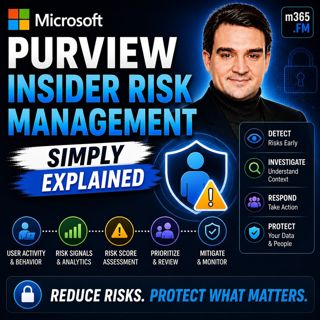
Welcome to another episode of Knowledge Nuggets with Mirko Peters. Today we're exploring Microsoft Purview Insider Risk Management, Microsoft's intelligent solution for identifying risky user behavior before it turns into a costly security incident. When organizations think about cybersecurity, they usually focus on external threats—hackers, malware, ransomware, and phishing attacks. But one of the biggest security risks often comes from inside the organization. Employees already have legitimate access to sensitive information. Whether through malicious intent or simple human error, that trusted access can become a significant business risk. Microsoft Purview Insider Risk Management helps organizations identify unusual patterns of user behavior, investigate potential insider threats, and respond appropriately while maintaining strong privacy protections. Rather than assuming every employee is a threat, it uses intelligent risk scoring and machine learning to distinguish between normal business activity and behavior that deserves closer attention. In this episode, we'll explore how Insider Risk Management works, how Microsoft calculates risk, and why privacy remains a central part of the entire solution.

WHY INSIDER RISK IS DIFFERENT
Traditional cybersecurity is designed to stop unauthorized users from gaining access. Firewalls block unwanted network traffic. Multi-factor authentication verifies identities. Endpoint protection detects malware. These technologies are extremely effective against external attacks. However, they all share one important assumption: Once users successfully authenticate, they are generally trusted. That assumption creates a significant blind spot. Insider threats don't involve breaking into the organization. They involve legitimate users performing activities that become risky over time. Insider risk generally falls into two categories. Malicious insider risk includes intentional activities such as data theft, intellectual property theft, sabotage, or unauthorized data exfiltration. Accidental insider risk includes users mistakenly sharing confidential information, forwarding sensitive emails, copying files to personal storage, or violating security policies without realizing it. Traditional security solutions rarely detect these behaviors because, technically, the user is authorized to perform many of the underlying actions. Microsoft Purview Insider Risk Management focuses on identifying risky behavior rather than simply validating user access.

WHAT IS MICROSOFT PURVIEW INSIDER RISK MANAGEMENT?
Microsoft Purview Insider Risk Management is a compliance capability within Microsoft Purview that helps organizations identify, investigate, and respond to potentially risky user behavior. Rather than monitoring individual activities in isolation, the system analyzes patterns across Microsoft 365. Signals are collected from multiple Microsoft services, including:
  • Exchange Online
  • SharePoint Online
  • OneDrive
  • Microsoft Teams
  • Microsoft Entra ID
  • Endpoint activity
  • Data Loss Prevention
  • Sensitivity labels
Machine learning evaluates these signals over time to determine whether behavior differs significantly from normal activity. The objective is not to spy on employees. Instead, Microsoft focuses on identifying situations where organizations should perform additional review before a genuine security incident occurs. Human investigators always make the final decision. The platform simply highlights behavior that deserves attention.

HOW RISK SCORING WORKS
Microsoft Purview Insider Risk Management does not generate alerts based on a single isolated action. Instead, it evaluates combinations of activities over time. Examples of monitored indicators include:
  • Large file downloads
  • Email forwarding
  • Printing sensitive documents
  • USB file transfers
  • Accessing sensitive SharePoint sites
  • Uploading data to cloud storage
  • Unusual login behavior
  • After-hours activity
Each event contributes to an overall risk score. A single large download might be completely normal. However, when combined with several additional indicators—such as forwarding emails to personal accounts after submitting a resignation—the overall pattern becomes significantly more suspicious. Machine learning compares current activity against historical behavior for both the individual user and similar job roles. Downloading source code may be normal for software developers. The same activity performed by someone in Human Resources would represent unusual behavior. The platform continuously learns organizational baselines to reduce false positives while highlighting meaningful anomalies. Importantly, risk scores represent probabilities—not proof of wrongdoing. Human review remains essential before any action is taken.

POLICIES, TEMPLATES, AND RISK INDICATORS
Microsoft provides predefined policy templates covering common insider risk scenarios. Examples include:
  • Departing employees
  • Data theft
  • Data leaks
  • Security policy violations
  • Risky user behavior
Administrators simply select the template most appropriate for their organization and configure the users or groups that should be included. Behind each policy are dozens of built-in indicators. These include activities such as:
  • External email forwarding
  • Printing
  • USB usage
  • Cloud storage uploads
  • SharePoint downloads
  • OneDrive synchronization
  • Sensitive file access
Organizations can further improve detection by integrating external business signals. Examples include:
  • HR systems
  • Employee resignation notices
  • Badge access systems
  • Legal investigations
  • Compliance events
These external signals provide additional context that significantly improves risk scoring accuracy. Rather than monitoring every employee equally, organizations focus on scenarios where risk is genuinely elevated.

INVESTIGATING INSIDER RISK
When Microsoft identifies suspicious behavior, investigators receive an alert within the Microsoft Purview compliance portal. Each alert includes:
  • Overall risk score
  • User information
  • Timeline of activities
  • Associated indicators
  • Supporting evidence
One of the most valuable features is the activity timeline. Rather than reviewing isolated events, investigators can understand the complete sequence of actions. For example:
  • File downloads
  • Email forwarding
  • USB transfers
  • After-hours activity
  • SharePoint access


Become a supporter of this podcast: https://www.spreaker.com/podcast/m365-fm-modern-work-security-and-productivity-with-microsoft-365--6704921/support.

Det här avsnittet är hämtat från ett öppet RSS-flöde och publiceras inte av Podme. Det kan innehålla reklam.

Avsnitt(857)

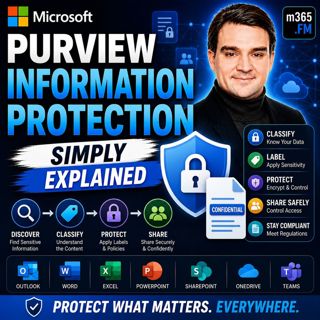
Microsoft Purview Information Protection - Simply Explained

Microsoft Purview Information Protection - Simply Explained

Welcome to another episode of Knowledge Nuggets with Mirko Peters. Today we're exploring Microsoft Purview Information Protection, the foundation of Microsoft's data classification and protection stra...

24 Juli 0s
Microsoft Purview Data Loss Prevention (DLP) - Simply Explained

Microsoft Purview Data Loss Prevention (DLP) - Simply Explained

Welcome to another episode of Knowledge Nuggets with Mirko Peters. Today we're exploring Microsoft Purview Data Loss Prevention (DLP), one of the most important security capabilities in Microsoft 365 ...

24 Juli 0s

Microsoft Entra Private Access - Simply Explained

Microsoft Entra Private Access - Simply Explained

Welcome to another episode of Knowledge Nuggets with Mirko Peters. Today we're exploring Microsoft Entra Internet Access, Microsoft's modern cloud-native approach to secure internet connectivity that ...

24 Juli 0s

Microsoft Graph Delta Queries - Simply Explained

Microsoft Graph Delta Queries - Simply Explained

Welcome to another episode of Knowledge Nuggets with Mirko Peters. Today we're exploring Microsoft Graph Delta Queries, one of the most powerful features for building efficient synchronization solutio...

24 Juli 0s

Responsible AI Is Good Business — Featuring Wiebke Apitzsch

Responsible AI Is Good Business — Featuring Wiebke Apitzsch

Artificial intelligence is transforming every industry, but successful AI adoption requires far more than deploying the latest models or building autonomous agents. In this episode of M365.fm, Mirko P...

24 Juli 0s

Microsoft Graph Webhooks - Simply Explained

Microsoft Graph Webhooks - Simply Explained

Welcome to another episode of Knowledge Nuggets with Mirko Peters. Today we're exploring Microsoft Graph Webhooks, one of the core building blocks for creating modern, event-driven Microsoft 365 appli...

24 Juli 0s

Microsoft Graph Change Notifications - Simply Explained

Microsoft Graph Change Notifications - Simply Explained

Welcome to another episode of Knowledge Nuggets with Mirko Peters. Today we're exploring Microsoft Graph Change Notifications, one of the most important capabilities for building modern, event-driven ...

24 Juli 0s

Populärt inom Politik & nyheter

svenska-fall
p3-krim
aftonbladet-daily
aftonbladet-krim
rss-krimstad
flashback-forever
rss-sanning-konsekvens
tv4-nyheterna-story
rss-krimreportrarna
motiv
rss-frandfors-horna
mannen-utan-spar
rss-vad-fan-hande
de-fyras-gang
rss-flodet
spar
politiken
rss-aftonbladet-krim
olyckan-inifran
grans