Arduino Pseudo Random Non-Consecutive Number Generator

Arduino Pseudo Random Non-Consecutive Number Generator

In this video we demonstrate how to create pseudo random numbers with Arduino - with a useful twist.

This lesson was inspired by the following viewer question:

How do I create Random Non-Consecutive numbers with Arduino?

P.S. These are the best tutorials that a complete idiot like you could ever make, thanks.

-Chris


Let's overview exactly what we will talk about in today's episode:
  1. Talk about pseudo random numbers.
  1. Identify the problem - using an Arduino sketch to demonstrate.
  1. Discuss how we might solve the problem.
  1. Write an Arduino sketch that solves the problem.
  1. Review what we talked about.

Before we answer the viewer's question it is important to talk about what a pseudo random number is.

A purely random number in the mathematical sense can't be predicted. The microcontroller that the Arduino uses (and for that case, most computers in general) can't really create pure random numbers.

What they create instead are called pseudo random numbers. These are numbers that appear to be randomly generated, but if studied over time a predictable pattern emerges.

The bottom line is that the random numbers we create with Arduino can be predicted.

Now there are clever ways to create pseudo random numbers that act like the real deal – you can learn about one method in our video tutorial talking all about random numbers – but for this discussion, let's return to our viewers inquiry.

Identify the Viewer's Problem - use an Arduino sketch to demonstrate.

Ok, so let's go back to the viewers question, he wants to generate random numbers, but he never wants the same number generated two times in a row.

Let's write an Arduino Sketch to make this clear.

//This sketch outputs pseudo random integers. //A variable to hold pseudo random integers. int randomInt = 0; void setup() { //Initiate serial communication. Serial.begin(9600); }//Close setup function void loop() { //Create a random number and assign it to the randomInt variable. randomInt = random(0, 10); //Send randomInt to the serial port for displaying on the serial monitor window. Serial.print(randomInt); }//Close loop function.

In the first block of code a variable that will hold the pseudo random integers is declared and initialized.

//A variable to hold pseudo random integers. int randomInt = 0;

In the setup() function we begin serial communication in order to display the numbers we generate on a computer display.

void setup() { //Initiate serial communication. Serial.begin(9600); }//Close setup function

In the loop() we create the random number with the Arduino random() function and assign the output to the variable we had just created. The random() function can take two arguments 1) the minimum value of the number we want generated 2) the maximum value we want generated.

//Create a random number and assign it to the randomInt variable. randomInt = random(0, 10);

I will use 0 for the minimum, and 10 for the maximum.

Every time through the loop, a new random number will be assigned the randomInt variable.

Finally, the value of randomInt is sent over the serial port to be displayed in the serial monitor window.

//Send randomInt to the serial port for displaying on the serial monitor window. Serial.print(randomInt);

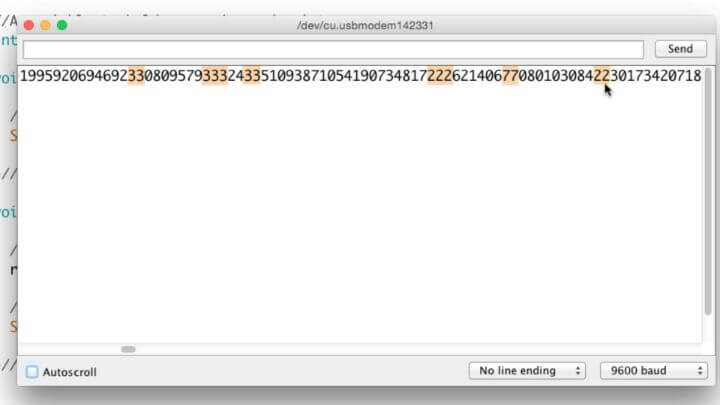
If you upload this code and open the serial monitor you will see in some cases where the same number shows up two times in a row.

This is the problem. The viewer doesn't ever want the same number two times in a row.

Discuss how we might solve the problem.

So let's talk about how we might solve this problem. We know we need to generate a random number.

What if we create a variable to track the previous random number?

Then we could use a condition that says something like "If the previous random number is equal to the random number that was just generated, toss that number out the window, and create a different one."

The final thing we would need to do is set the previous random number equal to the new random number, that way we keep updating our previous random number every time through the loop().

Let's Implement our solution in an Arduino Sketch.

Copy and paste this code into your Arduino IDE. All you need is an Arduino board attached to your computer to make it work.

//This sketch outputs pseudo random non-consecutive integers. //A variable to hold pseudo random non-consecutive integers. int randomInt = 0; //A variable to hold the previously assigned pseudo random non-consecutive integers. int previousRandomInt = 0; void setup() { //Initiate serial communication. Serial.begin(9600); }//Close setup function void loop() { //Create a random number and assign it to the randomInt variable. randomInt = random(0, 10); /*Check if the random number is the same as the previous random number. If it is, then reassign a new random number until it is different from the previously set one.*/ while (randomInt == previousRandomInt) { //Create a random number and assign it to the randomInt variable. randomInt = random(0, 10); //When a consecutive random number has been identified, indicate it. Serial.println(); }//close while statement //Set previousRandomInt equal to the current randomInt. previousRandomInt = randomInt; //Send randomInt to the serial port for displaying on the serial monitor window. Serial.print(randomInt); }//Close loop function.

If you upload this code to your Arduino and open the serial monitor window you will see the numbers scrolling across the serial monitor window, but now you will not witness any duplicates side-by-side. You may notice some X's intermittently between the numbers, this is where the Arduino sketch identified a duplicate random number and generated a replacement.

If you look through the code, you will see this is accomplished with a While Statement.

I hope you can find some application for this simple process of creating a pseudo random non-consecutive number with Arduino. Let me know what you think the comments!

Avsnitt(61)

Understanding the Arduino Sketchbook: Opening and Saving Arduino Sketches

Understanding the Arduino Sketchbook: Opening and Saving Arduino Sketches

Understanding how the Arduino IDE sets up its file directory system can spare you some confusion when it comes to saving, organizing and opening your Arduino sketches (or sketches you have downloaded ...

21 Apr 20179min

An Easy Way to Learn I2C, SPI, RTC, ADCs and More with this Awesome Arduino Education Shield

An Easy Way to Learn I2C, SPI, RTC, ADCs and More with this Awesome Arduino Education Shield

In this video we talk about an Arduino shield designed to teach you about shift registers, I2C, SPI, temperature sensors, real time clocks, analog to digital convertors and flash memory chips - all th...

20 Apr 20175min

The Process and Tools I use for Creating Arduino Tutorials

The Process and Tools I use for Creating Arduino Tutorials

This week's Episode is what I am calling an intermission, which is basically me taking a break from hardcore Arduino tutorial making, and present a less technical topic.  In this intermission video, I...

19 Apr 20178min

Using the Same Input to Trigger Multiple Arduinos

Using the Same Input to Trigger Multiple Arduinos

If you ever have a project using two or more Arduinos, it's likely you'll want them to work together. Say for example you have one Arduino connected to an LCD shield, and another Arduino controlling a...

18 Apr 20179min

6 Tips on Assembling an Arduino Shield (Or any Electronics Kit)

6 Tips on Assembling an Arduino Shield (Or any Electronics Kit)

In this video we will be talking about some key points to keep in mind when assembling an Arduino shield from a kit. Many of these tips will apply equally well to any type of electronics kit you are a...

17 Apr 20178min

A YouTube Channel for Learning about Arduino

A YouTube Channel for Learning about Arduino

In this episode I talk about the video channel that I host on YouTube. If you have watched any previous episodes of this channel then you know I focus on Arduino related topics. The purpose of the cha...

16 Apr 20175min

What is a Breakout Board for Arduino?

What is a Breakout Board for Arduino?

If you have been learning about Arduino for any amount of time, than you have probably come across the term Breakout Board.  Now, you might think, as I did when I first heard about breakout boards, th...

14 Apr 20178min

What is an Arduino Shield?

What is an Arduino Shield?

If you are learning about Arduino, you have no doubt come across the term Arduino Shield. This tutorial will explain what Arduino Shields are, why they are awesome, and several things to consider whe...

13 Apr 20179min

Populärt inom Utbildning

historiepodden-se
rss-bara-en-till-om-missbruk-medberoende-2
det-skaver
harrisons-dramatiska-historia
alska-oss
nu-blir-det-historia
johannes-hansen-podcast
rss-foraldramotet-bring-lagercrantz
not-fanny-anymore
roda-vita-rosen
rss-viktmedicinpodden
sektledare
allt-du-velat-veta
rss-sjalsligt-avkladd
sa-in-i-sjalen
rss-max-tant-med-max-villman
i-vantan-pa-katastrofen
rss-basta-livet
rib-podcast
rss-traningsklubben