Arduino Pseudo Random Non-Consecutive Number Generator

Arduino Pseudo Random Non-Consecutive Number Generator

In this video we demonstrate how to create pseudo random numbers with Arduino - with a useful twist.

This lesson was inspired by the following viewer question:

How do I create Random Non-Consecutive numbers with Arduino?

P.S. These are the best tutorials that a complete idiot like you could ever make, thanks.

-Chris


Let's overview exactly what we will talk about in today's episode:
  1. Talk about pseudo random numbers.
  1. Identify the problem - using an Arduino sketch to demonstrate.
  1. Discuss how we might solve the problem.
  1. Write an Arduino sketch that solves the problem.
  1. Review what we talked about.

Before we answer the viewer's question it is important to talk about what a pseudo random number is.

A purely random number in the mathematical sense can't be predicted. The microcontroller that the Arduino uses (and for that case, most computers in general) can't really create pure random numbers.

What they create instead are called pseudo random numbers. These are numbers that appear to be randomly generated, but if studied over time a predictable pattern emerges.

The bottom line is that the random numbers we create with Arduino can be predicted.

Now there are clever ways to create pseudo random numbers that act like the real deal – you can learn about one method in our video tutorial talking all about random numbers – but for this discussion, let's return to our viewers inquiry.

Identify the Viewer's Problem - use an Arduino sketch to demonstrate.

Ok, so let's go back to the viewers question, he wants to generate random numbers, but he never wants the same number generated two times in a row.

Let's write an Arduino Sketch to make this clear.

//This sketch outputs pseudo random integers. //A variable to hold pseudo random integers. int randomInt = 0; void setup() { //Initiate serial communication. Serial.begin(9600); }//Close setup function void loop() { //Create a random number and assign it to the randomInt variable. randomInt = random(0, 10); //Send randomInt to the serial port for displaying on the serial monitor window. Serial.print(randomInt); }//Close loop function.

In the first block of code a variable that will hold the pseudo random integers is declared and initialized.

//A variable to hold pseudo random integers. int randomInt = 0;

In the setup() function we begin serial communication in order to display the numbers we generate on a computer display.

void setup() { //Initiate serial communication. Serial.begin(9600); }//Close setup function

In the loop() we create the random number with the Arduino random() function and assign the output to the variable we had just created. The random() function can take two arguments 1) the minimum value of the number we want generated 2) the maximum value we want generated.

//Create a random number and assign it to the randomInt variable. randomInt = random(0, 10);

I will use 0 for the minimum, and 10 for the maximum.

Every time through the loop, a new random number will be assigned the randomInt variable.

Finally, the value of randomInt is sent over the serial port to be displayed in the serial monitor window.

//Send randomInt to the serial port for displaying on the serial monitor window. Serial.print(randomInt);

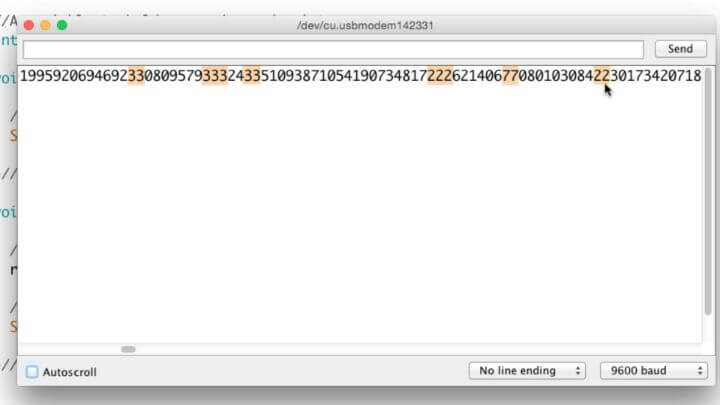
If you upload this code and open the serial monitor you will see in some cases where the same number shows up two times in a row.

This is the problem. The viewer doesn't ever want the same number two times in a row.

Discuss how we might solve the problem.

So let's talk about how we might solve this problem. We know we need to generate a random number.

What if we create a variable to track the previous random number?

Then we could use a condition that says something like "If the previous random number is equal to the random number that was just generated, toss that number out the window, and create a different one."

The final thing we would need to do is set the previous random number equal to the new random number, that way we keep updating our previous random number every time through the loop().

Let's Implement our solution in an Arduino Sketch.

Copy and paste this code into your Arduino IDE. All you need is an Arduino board attached to your computer to make it work.

//This sketch outputs pseudo random non-consecutive integers. //A variable to hold pseudo random non-consecutive integers. int randomInt = 0; //A variable to hold the previously assigned pseudo random non-consecutive integers. int previousRandomInt = 0; void setup() { //Initiate serial communication. Serial.begin(9600); }//Close setup function void loop() { //Create a random number and assign it to the randomInt variable. randomInt = random(0, 10); /*Check if the random number is the same as the previous random number. If it is, then reassign a new random number until it is different from the previously set one.*/ while (randomInt == previousRandomInt) { //Create a random number and assign it to the randomInt variable. randomInt = random(0, 10); //When a consecutive random number has been identified, indicate it. Serial.println(); }//close while statement //Set previousRandomInt equal to the current randomInt. previousRandomInt = randomInt; //Send randomInt to the serial port for displaying on the serial monitor window. Serial.print(randomInt); }//Close loop function.

If you upload this code to your Arduino and open the serial monitor window you will see the numbers scrolling across the serial monitor window, but now you will not witness any duplicates side-by-side. You may notice some X's intermittently between the numbers, this is where the Arduino sketch identified a duplicate random number and generated a replacement.

If you look through the code, you will see this is accomplished with a While Statement.

I hope you can find some application for this simple process of creating a pseudo random non-consecutive number with Arduino. Let me know what you think the comments!

Jaksot(61)

PC - Download and Install the Arduino IDE

PC - Download and Install the Arduino IDE

Discussion: Before you begin using the Arduino IDE, you must first learn how to download, install, and set your preferences.  This lesson is specifically tailored for those who use a PC.  The next les...

19 Maalis 20177min

Arduino Integrated Development Environment Version

Arduino Integrated Development Environment Version

Discussion: The following videos will show you step by step how to download and install the Arduino Integrated Development Environment, or IDE for short. We'll also be setting up some preferences in ...

18 Maalis 20172min

Map of the Familiarization Module

Map of the Familiarization Module

Discussion: Before we can start diving into programming the microcontroller on the Arduino, we need to have a solid understanding of the tools used to make it happen.  Therefore, in this particular le...

17 Maalis 20172min

Parts List

Parts List

Discussion: In this video, I'll explain what parts you'll need to complete this Arduino Crash Course. Immediately below this discussion section, there is a summary checklist of links for these parts. ...

16 Maalis 20177min

Rebranding Clarification

Rebranding Clarification

Open Source Hardware Group is now Programming Electronics Academy - we rebranded!

15 Maalis 20171min

Our Premium Arduino Training

Our Premium Arduino Training

Check out our Premium Arduino Training Course.

14 Maalis 20172min

If Statement Conditionals

If Statement Conditionals

If Statement (and else-if), Comparison Operators and Conditions In the last lesson, we learned about the if statement. The if statement was the perfect choice for setting up instructions to run only w...

13 Maalis 201714min

Fade an LED with Arduino

Fade an LED with Arduino

Let's expand the repertoire of output that we can use by looking at the function analogWrite(). I experienced much confusion with analogWrite(), because I suspected that it had to do with the analog p...

13 Maalis 201720min

Suosittua kategoriassa Koulutus

rss-murhan-anatomia
voi-hyvin-meditaatiot-2
psykopodiaa-podcast
rss-narsisti
adhd-podi
rss-liian-kuuma-peruna
aamukahvilla
rss-rahamania
rss-eron-alkemiaa
kesken
rss-duodecim-lehti
rss-koira-haudattuna
rahapuhetta
rss-tietoinen-yhteys-podcast-2
rss-niinku-asia-on
rss-uskonto-on-tylsaa
rss-onks-ok
rss-turun-yliopisto
rss-vapaudu-voimaasi
rss-finnish-daily-dialogues