6 Tips on Assembling an Arduino Shield (Or any Electronics Kit)

6 Tips on Assembling an Arduino Shield (Or any Electronics Kit)

In this video we will be talking about some key points to keep in mind when assembling an Arduino shield from a kit. Many of these tips will apply equally well to any type of electronics kit you are assembling.

So you just bought an awesome Arduino shield - it's going fly you to the moon and back, but before you start using it you have to do some basic assembly.

Here are six tips to help you get the assembly done right the first time.

Read the Directions:

The first advice is painfully obviously, but still worth mentioning - read the directions! When all you have to do is solder on some pin headers and a couple LEDs, it's tempting to ignore the need for directions and just go at. You're a genius right - who needs directions?

As J.R.R. Tolkien said...

"Shortcuts make for long delays".

Even on simple assemblies it pays to take the time to read through the directions. Most companies keep the directions online – they are really only a search away. I'm telling you it's worth it!

Consider Where you Will be Assembling the Board:

You may not have a dedicated space for your electronics addiction. There have been many times when I find myself soldering stuff on my kitchen table.

If you don't have a dedicated space, a couple things you will want to consider are:

• Having good lighting, so you can see what you are up to
• Access to a wall outlet for your soldering iron – you want the cord to have some maneuver room
• A floor without shag carpet, as they tend to be repositories for small electronics parts (the smallest parts are always the first to fall)

You can't always have the best spot, but you can make the best of what you have available.

Get Your Tools Together

Good instruction manuals will let you know what tools you need for the job.
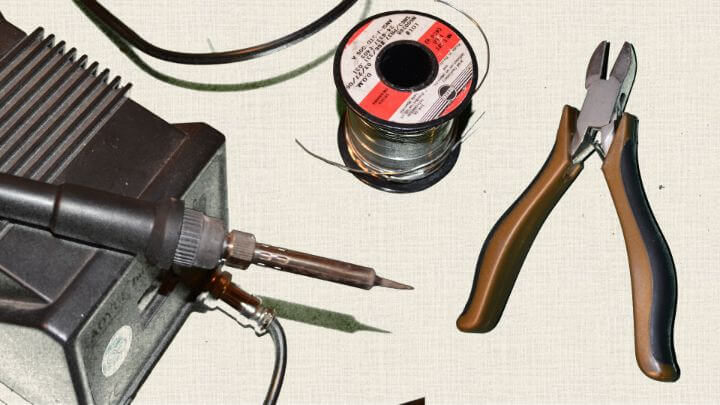
Generally speaking, the essential tools are:

• soldering iron
• solder
• wire cutters

Some other tools that are not necessary but make life way easier are:

• Needle nose: pliers for grabbing tiny parts
• Helping hand: these help not only holding parts when soldering, but also provide the magnifying glass which is good for checking solder joints
• Solder wick for undoing your mistakes
• A pair of safety glasses is also a good idea.

You might be thinking – ah, heck with safety glasses…

It's easy to write them off when assembling boards. What I have done is get a pair that is comfortable and that I keep clean - this makes using them less a hassle. It's a small precaution to take from getting a piece of tiny sharp metal in your eye.

Inventory All the Parts

For whatever reason, inventorying all the parts always seemed like a waste of time to me, but now it is something I make sure to do.

Two big reasons I do this. Many of the boards I get are from Kickstarter campaigns, so the people manufacturing these might be kind of new at the gig, and with all the stuff they have going on, it's very possible they missed a part in the package.

Another reason I like to do the inventory is so I know if I have extras. If I have pieces left over when I finish, then I am usually wondering if I did the assembly correct or not. If you do the inventory, then you can be confident that you assembled it right.

I also separate the components into different jars, or bowls. This helps me quickly find components when I am assembling the shield and prevents the pieces from ending up lost in the carpet.

Check Twice Solder Once

I like solder wick as much as the next guy, but I would prefer not use it. It is really worth your time to double check part locations before you start soldering.

I learned my lesson when I soldered a 24 pin connecter on the wrong side on a board. Now I always check a diagram or the directions at least twice before pulling out the solder.

After I solder, I also make it a point to look over the solder joints. I am amazed at how much my soldering joints can stink, even when I feel like I had done a great job (this is when a helping hand or magnifying glass is good to have).

Use an Arduino Board to Help Align the Pin Headers.

One thing all Arduino Shields have in common are pin headers. These are the metal rows of pins that go on the bottom of the shield and plug into the Arduino stackable headers.

If you don't get the pin headers aligned correctly then your shield may not fit well, or may not fit at all on top of the Arduino.

One trick to get the alignment right is to use an Arduino to hold the pin headers in the correct position when you solder them to the bottom of the shield. To do this, simply insert the headers how they would go into the Arduino, place the shield on top, and then do your soldering. It works like a charm.

Troubleshooting the Assembly

Now that your Arduino shield is fully assembled, it's time to get that puppy running.

Hopefully the shield came with some type of test sketch that you can load and it verifies that everything is up and running correctly. If not, try to find some code that you know works and load it onto the Arduino.

If you start with code that you can verify works (or at least works for others), it can be easier to troubleshoot any issues you might encounter. I know how demoralizing it can be to load your first sketch and getting nothing better errors when you press the verify button.

Here is a tidbit of moral support - there is a learning curve to everything - no matter how easy it is "supposed" to be.

In fact, some of my favorite shields took me a while to understand how to use. So try not to get frustrated if your sketch isn't working instantly. In the end, a little bit of determination goes a long way.

Do you have any tips for building Arduino shields or electronics kits in general? I would love to hear about them in the comments.

Episoder(61)

How to read voltages with analogRead()

How to read voltages with analogRead()

In the last lesson you learned about using the analogRead() function to collect data from a sensor connected to one of the Arduino analog pins. The range of data we received from the analogRead() func...

12 Mar 201714min

analogRead() and the Serial Port

analogRead() and the Serial Port

Knowing if something is on or off can be extremely useful, but often you will want to know more. How bright is the light? How fast is the satellite moving? These types of answers are often analog – th...

11 Mar 201712min

digitalRead() and the Serial Port

digitalRead() and the Serial Port

As simple as it may seem, knowing when something is either on or off can be a great tool for designing something useful. This lesson will answer the following questions: Is a button being pressed? Has...

10 Mar 201721min

How to Blink an LED with Arduino

How to Blink an LED with Arduino

The first program you usually write when learning a new programming language is called, "Hello World". Its only function is to display the words "Hello World" on the computer monitor. When learning to...

9 Mar 201714min

Understanding Variables

Understanding Variables

Let's have a discussion about a powerful and semi-confusing programming topic – variables. Arduino code variables are like buckets. You choose what types of stuff you want in the bucket and can change...

8 Mar 201711min

Understanding Arduino Syntax

Understanding Arduino Syntax

Arduino Code & Syntax Overview As you learned in Module 01, IDE stands for Integrated Development Environment. Pretty fancy sounding, and should make you feel smart any time you use it. The IDE is a t...

7 Mar 201710min

Arduino IDE and Sketch Overview

Arduino IDE and Sketch Overview

IDE stands for Integrated Development Environment. Pretty fancy sounding, and should make you feel smart anytime you use it. The IDE is a text editor like program that allows you to write computer cod...

6 Mar 20178min

Download & Install the Arduino IDE

Download & Install the Arduino IDE

One of the absolute best things about the Arduino IDE and platform is how easy it is to get started. The software that is installed on your computer is completely free and designed specifically for ea...

5 Mar 20175min

Populært innen Fakta

mikkels-paskenotter
fastlegen
dine-penger-pengeradet
relasjonspodden-med-dora-thorhallsdottir-kjersti-idem
foreldreradet
treningspodden
rss-strid-de-norske-borgerkrigene
jakt-og-fiskepodden
sinnsyn
rss-kunsten-a-leve
hverdagspsyken
rss-var-forste-kaffe
fryktlos
rss-kull
gravid-uke-for-uke
rss-bisarr-historie
lederskap-nhhs-podkast-om-ledelse
hagespiren-podcast
takk-og-lov-med-anine-kierulf
tomprat-med-gunnar-tjomlid