How to make a secret knock detector to trigger anything with only an Arduino and a few cheap components

How to make a secret knock detector to trigger anything with only an Arduino and a few cheap components

There are a couple good use-case scenarios for making a secret knock detector using an Arduino.

  • You are a spy who needs to authenticate your cohorts
  • You are a super hero who wants a secret knock to open the entrance to your lair

Whatever the reason - by the end of this tutorial you will know how to use an Arduino, a piezo transducer and a couple other cheap components to make secret knock detector.

Here is an overview of exactly what we will talk about in this lesson:
  1. The components you will need and how to set up this simple circuit.
  2. The concept of operation of this secret knock detector
  3. A thorough description of each block of code in the Arduino sketch
  4. Why North American grizzly bears love piezo transducers

For this secret knock detector circuit you need:

  • Arduino (I use the Arduino Uno) [1]
  • Solderless breadboard [1]
  • 1 Mohm Resistor [1]
  • Piezo transducer (aka buzzer) [1]
  • Jumper wires [4]
  • 5.1V Zener diode (for extra protection) [1]
  • No spill stopper for a "to-go" coffee cup
How to set up the Circuit:

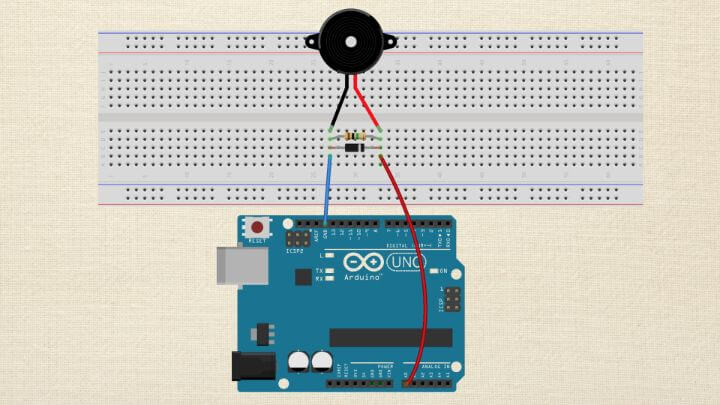
This is a really simple circuit to setup, below are step-by-step instructions and a breadboard diagram.

  1. Place the piezo transducer on the breadboard, with the positive lead and the negative lead on separate rails.
  2. Connect the positive lead to pin A0 on the Arduino and the other lead to ground.
  3. Finally, use the 1Mohm resistor to connect the leads of the piezo transducer.
  4. As an additional level of protection, you might consider adding a 5.1V zener diode between the leads to protect against high voltage spikes from frying your input pin - you might call it a cheap insurance policy.

An Overview of this Secret Knock Detectors operation

Here is the basic concept of how this will work.

We want something to happen when you tap out a secret code.

We will create a sequence of soft and hard taps - this will be our secret code which will be represented as 0's and 1's in an array.

For example:

secretKnock[secretKnockLength] = {0, 0, 1, 0};

The code above represents a secret code of soft , soft , hard, soft .

The piezo transducer will turn the mechanical pressure created by the tap into a signal that the Arduino analog pin can read. The level of the signal will determine whether a tap gets characterized as soft or hard.

The threshold of a soft vs hard tap need to be determined empirically, once you have the circuit built - it will depend on what you have the piezo transducer attached to - I have mine taped to a piece of paper.

You should start with the default threshold values provided in the sketch and change them to suit your specific setup.

Once a tap signal is picked up by the Arduino, the sketch will compare the entered sequence of taps to the secret code, one tap at a time.

If the code is entered correctly, then we will trigger an action on the output pin. In this code below, we trigger an LED to turn on for a couple seconds - but you could trigger a servo arm, a pump, or whatever you might need.

If the code is entered incorrectly - nothing happens.

Here is the code for your hacking enjoyment:

/* A simple sketch to detect a secret knock using a piezo transducer Created JUL 2015 by Michael James http://www.programmingelectronics.com/ This code is in the public domain */ const int outputPin = 6; // led indicator connected to digital pin const int knockSensor = A0; // the piezo is connected to an analog pin const int thresholdHIGH = 150; // threshold value to decide when the detected knock is hard (HIGH) const int thresholdLOW = 120; // threshold value to decide when the detected knock is gentle (LOW) const int secretKnockLength = 4; //How many knocks are in your secret knock /* This is the secret knock sequence * 0 represents a LOW or quiet knock * 1 represents a HIGH or loud knock * The sequence can be as long as you like, but longer codes increase the difficulty of matching */ const int secretKnock[secretKnockLength] = {0, 0, 1, 0}; int secretCounter = 0; //this tracks the correct knocks and allows you to move through the sequence int sensorReading = 0; // variable to store the value read from the sensor pin void setup() { //Set the output pin as an OUTPUT pinMode(outputPin, OUTPUT); //Begin Serial Communication. Serial.begin(9600); } void loop() { // read the piezo sensor and store the value in the variable sensorReading: sensorReading = analogRead(knockSensor); // First determine is knock if Hard (HIGH) or Gentle (LOW) //Hard knock (HIGH) is detected if (sensorReading >= thresholdHIGH) { //Check to see if a Hard Knock matches the Secret Knock in the correct sequence. if (secretKnock[secretCounter] == 1) { //The Knock was correct, iterate the counter. secretCounter++; Serial.println("Correct"); } else { //The Knock was incorrect, reset the counter secretCounter = 0; Serial.println("Fail - You are a spy!"); }//close if //Allow some time to pass before sampling again to ensure a clear signal. delay(100); //Gentle knock (LOW) is detected } else if (sensorReading >= thresholdLOW) { //Check to see if a Gentle Knock matches the Secret Knock in the correct sequence. if (secretKnock[secretCounter] == 0) { //The Knock was correct, iterate the counter. secretCounter++; Serial.println("Correct"); } else { //The Knock was incorrect, reset the counter. secretCounter = 0; Serial.println("Fail - You are a spy!"); }//close if //Allow some time to pass before sampling again to ensure a clear signal. delay(100); }//close if else //Check for successful entry of the code, by seeing if the entire array has been walked through. if (secretCounter == (secretKnockLength) ) { Serial.println("Welcome in fellow Illuminante!"); //if the sececret knock is correct, illuminate the LED for a couple seconds digitalWrite(outputPin, HIGH); delay(2000); digitalWrite(outputPin, LOW); //Reset the secret counter to 0. secretCounter = 0; }//close success check }//close loop

If you enjoyed this lesson, you should join our free Arduino Crash Course - it has 19 Video Training lessons all about using Arduino (you can sign up below).

Episoder(61)

Data Types: One size does not fit all

Data Types: One size does not fit all

Discussion: We're going to explore some of the specific data types you'll encounter as you begin to program with Arduino. We'll tackle data types in more detail, to include: Integer and Integer Qual...

27 Mar 201711min

Understanding Variables

Understanding Variables

Discussion: This lesson covers one of the most fundamental of all programming concepts: Variables. This is a really exciting topic because once you have a handle on how variables work, you have one o...

26 Mar 201711min

Syntax; the spelling and grammar of programming

Syntax; the spelling and grammar of programming

You Will Need: The Arduino IDE installed and an Arduino connected to your computer. Discussion: In this lesson, we're going to be talking about programming syntax. We'll be introducing some of the ...

25 Mar 201711min

Progress vs Perfection: Chicken Analogy

Progress vs Perfection: Chicken Analogy

Discussion: Will the Chicken Cross the Road? So there's this chicken, and he's on the side of the road. He wants to cross the road. He wants to get to the other side. Before he steps out and crosses t...

24 Mar 20172min

The Arduino Development Toolchain - How it all gets done...

The Arduino Development Toolchain - How it all gets done...

Discussion: In this lesson, we're going to do an overview of the Arduino toolchain. The toolchain includes all of the software tools that are between us pressing the Verify/Upload buttons and that co...

23 Mar 20178min

Arduino Board Hardware overview for people like me

Arduino Board Hardware overview for people like me

Discussion: This lesson continues our quest of learning more about programming and electronics. In previous lessons, we already discussed several reasons why we have chosen to use an Arduino board as...

22 Mar 201710min

Everything you need to know about the Arduino IDE (for now)

Everything you need to know about the Arduino IDE (for now)

Discussion: Now that you have downloaded and set preferences, you need to become familiar with the Arduino Integrated Development Environment, or IDE for short.  It works just like a text editor progr...

21 Mar 201711min

Mac - Download and Install the Arduino IDE

Mac - Download and Install the Arduino IDE

Discussion: Before you begin using the Arduino IDE, you must first learn how to download, install, and set your preferences. This lesson is specifically tailored for those who use a Mac. (The last le...

20 Mar 20177min

Populært innen Fakta

mikkels-paskenotter
fastlegen
dine-penger-pengeradet
relasjonspodden-med-dora-thorhallsdottir-kjersti-idem
foreldreradet
treningspodden
rss-strid-de-norske-borgerkrigene
jakt-og-fiskepodden
sinnsyn
rss-kunsten-a-leve
hverdagspsyken
rss-var-forste-kaffe
fryktlos
rss-kull
gravid-uke-for-uke
rss-bisarr-historie
lederskap-nhhs-podkast-om-ledelse
hagespiren-podcast
takk-og-lov-med-anine-kierulf
tomprat-med-gunnar-tjomlid