
Azure Storage Accounts - Simply Explained

Azure Storage Accounts - Simply Explained

An Azure Storage Account is the foundation of Microsoft's cloud storage platform and acts as a single container that brings together multiple storage services under one roof. Rather than creating separate systems for files, messages, and application data, a Storage Account provides one secure, scalable location where different storage technologies work together seamlessly. Every Storage Account has a globally unique name, is deployed in a specific Azure region, and belongs to a resource group. It also allows you to choose performance tiers and redundancy options that determine how your data is stored, protected, and replicated across Microsoft's global infrastructure.

UNDERSTANDING THE FOUR STORAGE SERVICES
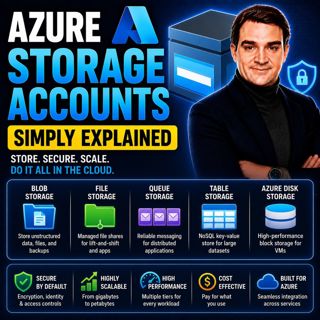
Inside every Azure Storage Account are four core storage services, each designed for a different purpose. Blob Storage stores unstructured data such as documents, images, videos, backups, and log files. Azure Files provides fully managed cloud-based file shares that behave like traditional network drives and can be mounted by Windows, Linux, and macOS systems. Queue Storage enables reliable messaging between applications, allowing background processes to communicate asynchronously without slowing down user-facing applications. Table Storage is a highly scalable NoSQL key-value database for storing structured data without requiring the complexity of a traditional relational database. Together, these services allow developers to solve a wide range of storage scenarios using a single platform.

PERFORMANCE, REDUNDANCY, AND STORAGE TIERS
Azure Storage Accounts can be customized to meet different performance and availability requirements. Standard storage is suitable for most workloads, including documents, backups, application files, and general-purpose storage, while Premium storage delivers lower latency and higher performance for demanding workloads such as virtual machine disks. Azure also provides multiple redundancy options, including Locally Redundant Storage (LRS), Zone-Redundant Storage (ZRS), Geo-Redundant Storage (GRS), and Geo-Zone-Redundant Storage (GZRS). These options determine how many copies of your data Azure maintains and whether those copies remain within a single data center, across multiple availability zones, or even in a secondary Azure region for disaster recovery.

HOW THE STORAGE SERVICES WORK TOGETHER
The real power of Azure Storage Accounts comes from combining multiple storage services within a single application. For example, a photo-sharing application might store uploaded images in Blob Storage, keep photo metadata inside Table Storage, place image-processing jobs into Queue Storage, and store shared configuration files using Azure Files. Because all four services exist within the same Storage Account, organizations benefit from centralized billing, unified security, shared networking, encryption, access control, and monitoring. This integrated architecture reduces complexity while allowing each storage service to focus on the workload it handles best.

SECURITY, SCALABILITY, AND MANAGEMENT
Azure Storage Accounts include enterprise-grade security features out of the box. All stored data is encrypted automatically using Microsoft-managed encryption keys, while Microsoft Entra ID integration enables identity-based authentication and role-based access control. Storage firewalls, Shared Access Signatures (SAS), Private Endpoints, Azure Defender for Storage, and immutable storage policies provide additional layers of protection for sensitive business data. Whether you're storing a few gigabytes or multiple petabytes, Azure automatically scales capacity and performance without requiring administrators to manage storage hardware or infrastructure, making it suitable for organizations of every size.

CHOOSING THE RIGHT STORAGE OPTION
Selecting the right Azure storage service depends entirely on the type of data you're working with. Blob Storage is ideal for large files, media, backups, and data lakes. Azure Files replaces traditional file servers with cloud-hosted network shares. Queue Storage enables reliable communication between distributed applications and background services. Table Storage offers a lightweight, cost-effective solution for structured NoSQL data with simple lookup requirements. By understanding the strengths of each storage service and combining them within a single Storage Account, organizations can build scalable, secure, and highly efficient cloud applications while simplifying storage management across their Azure environment.

Become a supporter of this podcast: https://www.spreaker.com/podcast/m365-fm-modern-work-security-and-productivity-with-microsoft-365--6704921/support.

Det här avsnittet är hämtat från ett öppet RSS-flöde och publiceras inte av Podme. Det kan innehålla reklam.

Avsnitt(801)

Azure DDoS Protection - Simply Explained

Azure DDoS Protection - Simply Explained

Azure DDoS Protection is Microsoft's managed service for defending internet-facing applications against Distributed Denial-of-Service (DDoS) attacks. These attacks attempt to overwhelm websites, APIs,...

18 Juli 16min

Azure Network Security Groups - Simply Explained

Azure Network Security Groups - Simply Explained

Azure DDoS Protection is Microsoft's managed service for defending internet-facing applications against Distributed Denial-of-Service (DDoS) attacks. These attacks attempt to overwhelm websites, APIs,...

18 Juli 14min

Azure Virtual Network - Simply Explained

Azure Virtual Network - Simply Explained

An Azure Virtual Network (VNet) is your own private network inside Microsoft Azure. It provides the secure foundation for virtually every cloud workload you deploy, including virtual machines, databas...

18 Juli 17min

Azure Private Link - Simply Explained

Azure Private Link - Simply Explained

Azure Private Link is Microsoft's networking service that enables secure, private connectivity between your Azure Virtual Network and Azure Platform-as-a-Service (PaaS) resources such as Azure Storage...

18 Juli 16min

Azure Traffic Manager - Simply Explained

Azure Traffic Manager - Simply Explained

Azure Traffic Manager is Microsoft's global DNS-based traffic distribution service that directs users to the most appropriate application endpoint anywhere in the world. Instead of sending every user ...

18 Juli 16min

Azure DNS - Simply Explained

Azure DNS - Simply Explained

Azure DNS is Microsoft's fully managed Domain Name System (DNS) hosting service that translates human-friendly domain names like contoso.com into the IP addresses computers use to communicate. Instead...

18 Juli 15min

MCP (Model Context Protocol) - Simply Explained

MCP (Model Context Protocol) - Simply Explained

The Model Context Protocol (MCP) is an open standard that allows AI models to securely connect to external tools, applications, and data sources using a single, consistent protocol. Before MCP, every ...

17 Juli 15min

Populärt inom Politik & nyheter

aftonbladet-krim
svenska-fall
p3-krim
rss-krimstad
tv4-nyheterna-story
aftonbladet-daily
flashback-forever
de-fyras-gang
mannen-utan-spar
motiv
rss-sanning-konsekvens
rss-vad-fan-hande
spar
rss-aftonbladet-krim
rss-frandfors-horna
rss-krimreportrarna
politiken
olyckan-inifran
rss-flodet
krimmagasinet

















