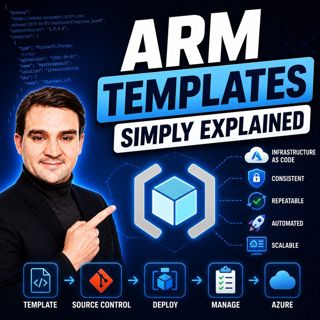
ARM Templates - Simply Explained
If you've ever built Azure resources by clicking through the Azure Portal, you've probably wondered how large organizations deploy identical environments over and over again without making mistakes. The answer is ARM Templates. In this episode, we explain Azure Resource Manager Templates in plain English, exploring how they automate Azure deployments through Infrastructure as Code. Whether you're an Azure administrator, cloud engineer, developer, or simply beginning your cloud journey, this episode shows how ARM Templates help you build consistent, repeatable, and reliable Azure environments with confidence.

WHAT IS AZURE RESOURCE MANAGER?
Azure Resource Manager, commonly known as ARM, is the management layer behind every action performed in Microsoft Azure. Every deployment made through the Azure Portal, Azure CLI, PowerShell, REST APIs, or SDKs is processed by ARM. It authenticates users, validates permissions, manages dependencies, organizes resources into Resource Groups, and ensures Azure services are created in the correct order. ARM provides a consistent deployment engine regardless of which Azure management tool you choose.

INFRASTRUCTURE AS CODE EXPLAINED
ARM Templates are Microsoft's implementation of Infrastructure as Code (IaC). Instead of manually creating resources through the Azure Portal, administrators describe the desired infrastructure in a JSON file. Azure then reads this template and automatically provisions the required resources. This declarative approach focuses on the final desired state rather than the individual deployment steps, making cloud infrastructure repeatable, version-controlled, and fully automatable across development, testing, staging, and production environments.

THE BUILDING BLOCKS OF AN ARM TEMPLATE
Every ARM Template follows a structured layout consisting of key sections such as the schema definition, content version, parameters, variables, resources, and outputs. Parameters allow templates to be reused across different environments, variables simplify repetitive values, resources define the Azure services to deploy, and outputs return useful deployment information once provisioning is complete. Together, these building blocks create a flexible blueprint that Azure can interpret consistently every time it runs.

REUSABLE DEPLOYMENTS AT SCALE
One of the greatest strengths of ARM Templates is reusability. By combining parameters, variables, conditional deployments, copy loops, and linked templates, organizations can build modular infrastructure that scales across multiple projects and environments. Instead of maintaining separate deployment files for development, testing, and production, the same template can be reused with different parameter files, reducing maintenance while ensuring every deployment remains consistent and predictable.

DEPLOYING ARM TEMPLATES ARM
Templates can be deployed through multiple methods including the Azure Portal, Azure CLI, Azure PowerShell, Azure Cloud Shell, Azure DevOps, and GitHub Actions. Before deployment, Azure validates the template and offers What-If analysis to preview changes before any resources are created. Every deployment is also recorded in Azure's deployment history, providing valuable auditing, troubleshooting, and compliance capabilities throughout the infrastructure lifecycle.

ARM TEMPLATES VS BICEP
While ARM Templates remain the deployment engine behind Azure, Microsoft now recommends Bicep as the preferred authoring language. Bicep offers a cleaner, more readable syntax that automatically compiles into ARM JSON templates during deployment. Features such as automatic dependency handling, reusable modules, simplified expressions, and significantly reduced code make Bicep easier to write and maintain. Nevertheless, understanding ARM Templates remains essential because Azure deployments ultimately execute as ARM, and troubleshooting often requires understanding the underlying template structure.

AVOIDING COMMON MISTAKES
Like any Infrastructure as Code solution, ARM Templates require careful validation. Common issues include JSON syntax errors, incorrect parameter references, outdated API versions, and deployment validation failures. Fortunately, tools such as Visual Studio Code with the ARM Tools extension, deployment validation commands, and Azure deployment logs help identify problems before resources are provisioned, reducing failed deployments and improving reliability across production environments.

GETTING STARTED WITH ARM TEMPLATES
The easiest way to begin learning ARM Templates is by exporting an existing Azure deployment from the Azure Portal and studying its structure. From there, small modifications can be introduced before progressing toward parameterized templates stored in Git repositories and integrated into CI/CD pipelines. As confidence grows, administrators can gradually adopt Infrastructure as Code practices while building reusable deployment libraries for future Azure projects.

KEY TAKEAWAYS
ARM Templates are the foundation of automated Azure infrastructure. By replacing manual portal configuration with reusable Infrastructure as Code, organizations achieve consistent deployments, improved governance, better collaboration, and significantly reduced human error. Although Microsoft recommends Bicep for new projects, understanding ARM Templates remains an essential Azure skill because every Azure deployment ultimately relies on Azure Resource Manager behind the scenes.

Become a supporter of this podcast: https://www.spreaker.com/podcast/m365-fm-modern-work-security-and-productivity-with-microsoft-365--6704921/support.

Denne episoden er hentet fra en åpen RSS-feed og er ikke publisert av Podme. Den kan derfor inneholde annonser.

Episoder(744)

Beyond Chat: Building Real Business Value with Microsoft 365 Copilot Agents featuring Steve Corey [MVP]

Beyond Chat: Building Real Business Value with Microsoft 365 Copilot Agents featuring Steve Corey [MVP]

Artificial intelligence is rapidly moving beyond simple chat interfaces. Organizations are no longer asking AI to answer questions—they're building intelligent agents that automate business processes,...

15 Jul 1h 1min

How to Become a High: Performing Microsoft Partner

How to Become a High: Performing Microsoft Partner

What separates an average Microsoft partner from a high-performing one? It isn't simply winning more deals or hiring more salespeople. The most successful partners build systems that continuously gene...

15 Jul 17min

The Microsoft Partner Journey Explained

The Microsoft Partner Journey Explained

The Microsoft AI Cloud Partner Program has evolved dramatically, but many partners are still approaching it with an outdated mindset. In this episode of m365.fm, we break down the complete Microsoft P...

15 Jul 14min

How to Build a Winning Microsoft Partner Strategy

How to Build a Winning Microsoft Partner Strategy

What separates Microsoft partners that consistently grow from those that simply maintain their status? In this episode of m365.fm, we break down the four strategic pillars that transform Microsoft par...

15 Jul 17min
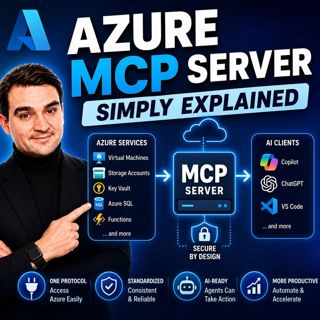
Azure MCP Server - Simply Explained

Azure MCP Server - Simply Explained

Artificial Intelligence is rapidly evolving from simply answering questions to actively performing real work. But for AI agents to become truly useful, they need secure access to cloud resources, data...

15 Jul 17min
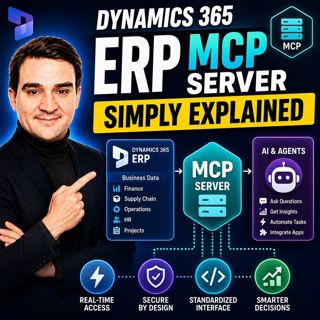
Dynamics 365 ERP MCP Server - Simply Explained

Dynamics 365 ERP MCP Server - Simply Explained

Artificial Intelligence is transforming how businesses interact with enterprise systems, but connecting AI assistants to ERP platforms has traditionally required custom APIs, complex integrations, and...

15 Jul 13min
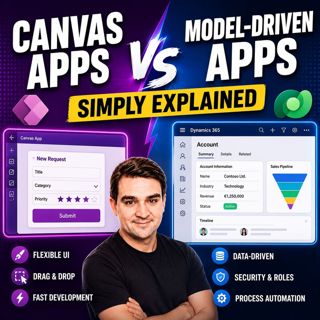
Canvas Apps vs Model-Driven Apps - Simply Explained

Canvas Apps vs Model-Driven Apps - Simply Explained

Microsoft Power Apps offers two primary ways to build business applications: Canvas Apps and Model-Driven Apps. At first glance they may appear similar, but they are designed for very different scenar...

15 Jul 15min

Infrastructure as Code - Simply Explained

Infrastructure as Code - Simply Explained

Managing cloud infrastructure by clicking through the Azure Portal might work for a single virtual machine, but it quickly becomes slow, inconsistent, and difficult to maintain as environments grow. I...

15 Jul 16min

Populært innen Politikk og nyheter

giver-og-gjengen-vg
aftenpodden-usa
aftenpodden
fotballpodden-2
forklart
popradet
stopp-verden
det-store-bildet
rss-gukild-johaug
hanna-de-heldige
rss-ness
nokon-ma-ga
dine-penger-pengeradet
aftenbla-bla
rss-utenrikskomiteen-med-bogen-og-grasvik
lydartikler-fra-aftenposten
e24-podden
rss-penger-polser-og-politikk
rss-hor-na-krim-2
rss-espen-lee-usensurert