Arduino Pseudo Random Non-Consecutive Number Generator

Arduino Pseudo Random Non-Consecutive Number Generator

In this video we demonstrate how to create pseudo random numbers with Arduino - with a useful twist.

This lesson was inspired by the following viewer question:

How do I create Random Non-Consecutive numbers with Arduino?

P.S. These are the best tutorials that a complete idiot like you could ever make, thanks.

-Chris


Let's overview exactly what we will talk about in today's episode:
  1. Talk about pseudo random numbers.
  1. Identify the problem - using an Arduino sketch to demonstrate.
  1. Discuss how we might solve the problem.
  1. Write an Arduino sketch that solves the problem.
  1. Review what we talked about.

Before we answer the viewer's question it is important to talk about what a pseudo random number is.

A purely random number in the mathematical sense can't be predicted. The microcontroller that the Arduino uses (and for that case, most computers in general) can't really create pure random numbers.

What they create instead are called pseudo random numbers. These are numbers that appear to be randomly generated, but if studied over time a predictable pattern emerges.

The bottom line is that the random numbers we create with Arduino can be predicted.

Now there are clever ways to create pseudo random numbers that act like the real deal – you can learn about one method in our video tutorial talking all about random numbers – but for this discussion, let's return to our viewers inquiry.

Identify the Viewer's Problem - use an Arduino sketch to demonstrate.

Ok, so let's go back to the viewers question, he wants to generate random numbers, but he never wants the same number generated two times in a row.

Let's write an Arduino Sketch to make this clear.

//This sketch outputs pseudo random integers. //A variable to hold pseudo random integers. int randomInt = 0; void setup() { //Initiate serial communication. Serial.begin(9600); }//Close setup function void loop() { //Create a random number and assign it to the randomInt variable. randomInt = random(0, 10); //Send randomInt to the serial port for displaying on the serial monitor window. Serial.print(randomInt); }//Close loop function.

In the first block of code a variable that will hold the pseudo random integers is declared and initialized.

//A variable to hold pseudo random integers. int randomInt = 0;

In the setup() function we begin serial communication in order to display the numbers we generate on a computer display.

void setup() { //Initiate serial communication. Serial.begin(9600); }//Close setup function

In the loop() we create the random number with the Arduino random() function and assign the output to the variable we had just created. The random() function can take two arguments 1) the minimum value of the number we want generated 2) the maximum value we want generated.

//Create a random number and assign it to the randomInt variable. randomInt = random(0, 10);

I will use 0 for the minimum, and 10 for the maximum.

Every time through the loop, a new random number will be assigned the randomInt variable.

Finally, the value of randomInt is sent over the serial port to be displayed in the serial monitor window.

//Send randomInt to the serial port for displaying on the serial monitor window. Serial.print(randomInt);

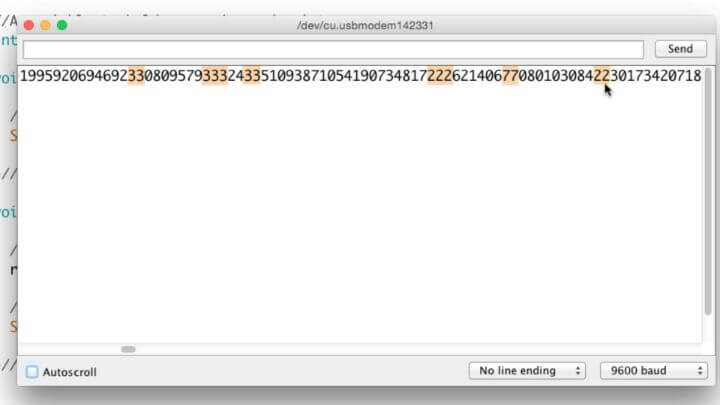
If you upload this code and open the serial monitor you will see in some cases where the same number shows up two times in a row.

This is the problem. The viewer doesn't ever want the same number two times in a row.

Discuss how we might solve the problem.

So let's talk about how we might solve this problem. We know we need to generate a random number.

What if we create a variable to track the previous random number?

Then we could use a condition that says something like "If the previous random number is equal to the random number that was just generated, toss that number out the window, and create a different one."

The final thing we would need to do is set the previous random number equal to the new random number, that way we keep updating our previous random number every time through the loop().

Let's Implement our solution in an Arduino Sketch.

Copy and paste this code into your Arduino IDE. All you need is an Arduino board attached to your computer to make it work.

//This sketch outputs pseudo random non-consecutive integers. //A variable to hold pseudo random non-consecutive integers. int randomInt = 0; //A variable to hold the previously assigned pseudo random non-consecutive integers. int previousRandomInt = 0; void setup() { //Initiate serial communication. Serial.begin(9600); }//Close setup function void loop() { //Create a random number and assign it to the randomInt variable. randomInt = random(0, 10); /*Check if the random number is the same as the previous random number. If it is, then reassign a new random number until it is different from the previously set one.*/ while (randomInt == previousRandomInt) { //Create a random number and assign it to the randomInt variable. randomInt = random(0, 10); //When a consecutive random number has been identified, indicate it. Serial.println(); }//close while statement //Set previousRandomInt equal to the current randomInt. previousRandomInt = randomInt; //Send randomInt to the serial port for displaying on the serial monitor window. Serial.print(randomInt); }//Close loop function.

If you upload this code to your Arduino and open the serial monitor window you will see the numbers scrolling across the serial monitor window, but now you will not witness any duplicates side-by-side. You may notice some X's intermittently between the numbers, this is where the Arduino sketch identified a duplicate random number and generated a replacement.

If you look through the code, you will see this is accomplished with a While Statement.

I hope you can find some application for this simple process of creating a pseudo random non-consecutive number with Arduino. Let me know what you think the comments!

Episoder(61)

Throw out your breadboard!  Dr. Duino: An Arduino Shield for debugging and developing Arduino projects

Throw out your breadboard! Dr. Duino: An Arduino Shield for debugging and developing Arduino projects

In the last couple of episodes we have talked about Arduino shields and breakout boards. In this video, we will review a specific Arduino shield that makes developing projects and debugging sketches o...

4 Apr 201711min

Shorthand Arithmetic :: Using Compound Operators (+= , -= , *= , /= ) with Arduino

Shorthand Arithmetic :: Using Compound Operators (+= , -= , *= , /= ) with Arduino

In this lesson we discuss some common shorthand for simple arithmetic in Arduino. We cover several compound operators that add, subtract, multiply and divide making it easy to increment variables in u...

3 Apr 201712min

Understanding Boolean Data Types and Using the Boolean NOT (!) operator to Switch Arduino Pin States

Understanding Boolean Data Types and Using the Boolean NOT (!) operator to Switch Arduino Pin States

2 Apr 20178min

What to do when you just don't know :: Arduino, ADXL345 triple axis accelerometer and an RGB LED

What to do when you just don't know :: Arduino, ADXL345 triple axis accelerometer and an RGB LED

This lesson discusses what to do when you open an existing program and realize that you simply don't understand all the stuff that is going on. It also talks about using the ADXL345 triple axis accele...

1 Apr 201714min

3 Ways to Use Acceleration in an Arduino Sketch

3 Ways to Use Acceleration in an Arduino Sketch

This lesson covers three easy ways to implement some form of acceleration in your Arduino sketches. It will cover the following: Linear Acceleration Exponential Acceleration Messing Around with the S...

31 Mar 201717min

Check out our premium Arduino Training Course

Check out our premium Arduino Training Course

30 Mar 20172min

Understanding the Arduino uber functions loop() and setup()

Understanding the Arduino uber functions loop() and setup()

Discussion: In this lesson, we're going to discuss two very special functions that you will use in every single Arduino sketch that you write. They're called Setup and Loop. Specifically, we'll cover...

29 Mar 201710min

Functions: Let's make programming Arduino as easy as possible

Functions: Let's make programming Arduino as easy as possible

Discussion: In this lesson, we're going to do an overview of functions. This will be just a general discussion to lay out a framework for understanding how functions work and how we can use them. Mor...

28 Mar 201711min

Populært innen Fakta

mikkels-paskenotter
fastlegen
dine-penger-pengeradet
relasjonspodden-med-dora-thorhallsdottir-kjersti-idem
foreldreradet
treningspodden
rss-strid-de-norske-borgerkrigene
jakt-og-fiskepodden
sinnsyn
rss-kunsten-a-leve
hverdagspsyken
rss-var-forste-kaffe
fryktlos
rss-kull
gravid-uke-for-uke
rss-bisarr-historie
lederskap-nhhs-podkast-om-ledelse
hagespiren-podcast
takk-og-lov-med-anine-kierulf
tomprat-med-gunnar-tjomlid