
Power BI Measure Cleanup: PBIP, TMDL & How I Refactored 500 Measures Like Real Code

Power BI Measure Cleanup: PBIP, TMDL & How I Refactored 500 Measures Like Real Code

Power BI measure cleanup, PBIP projects, TMDL, semantic model refactoring and bulk editing – this episode is for people searching “clean up Power BI measures”, “PBIP vs PBIX”, “rename measures in bulk”, “Power BI semantic model as code”, “TMDL Power BI” or “version control for Power BI models”. If your field list reads like goblin script and every dashboard change feels like tiptoeing around “TotalFinal_2”, this conversation shows how to turn your model into something you can actually refactor, diff and trust.

We start with the real pain: opening a model with 500+ measures named like “M1”, “Total1” and “NewCalc2”, where every choice requires drilling, cross‑checking and second‑guessing what the calculation does. That chaos doesn’t just annoy power users, it slows analysts, multiplies duplicate logic and quietly erodes trust in your numbers because no one is sure which “revenue” is the real source of truth. Manual cleanup by clicking through dialogs is the natural‑1 of model maintenance—slow, brittle and always falling behind incoming requests—so the question becomes: how do you treat this like code instead of a black box?

From there, we draw the line between PBIX as a sealed vault and PBIP as a project you can actually read. PBIX keeps everything in one binary container that’s fine for small, local work but terrible for diffing, versioning and bulk edits. PBIP flips that into a project‑ and text‑first layout where reports and models split into structured folders and files, so Git, VS Code and standard dev workflows finally have something meaningful to work with. You’ll hear why that shift—from “mystery file on the desktop” to “project in a repo”—unlocks visibility, revertability and automation, and sets the stage for real model refactoring instead of endless right‑click–rename loops.

Then we introduce TMDL (Tabular Model Definition Language) as the cheat code that lays your semantic model out in human‑readable text. Measures, columns and relationships become lines you can search, script and mass‑edit, turning color swaps, naming conventions and documentation passes from multi‑hour chores into a couple of global replaces and a safe commit. We walk through how to export and work with the tabular definition, why you always keep backups and follow Microsoft docs on supported workflows, and how treating your model as text lets you run true “model refactors” instead of spreadsheet‑style surgery.

WHAT YOU WILL LEARN
  • Why messy measure naming quietly kills report usability, trust and team productivity.
  • How PBIX locks your model in a binary box and where that hurts collaboration.
  • How PBIP turns Power BI projects into readable, diff‑friendly folder structures.
  • Why visibility, revertability and automation are the real win of project‑style formats.
  • What TMDL is and how it exposes your semantic model as editable text.
  • How to use text‑based model definitions for bulk renaming, color changes and documentation.
  • Why treating models “as code” enables Git, pull requests and safer refactors.
  • A pragmatic path from goblin‑script measures to a clean, maintainable semantic model.
THE CORE INSIGHT

The core insight of this episode is that Power BI measure chaos isn’t a “be more disciplined” problem—it’s a format problem. Once you move from PBIX vaults to PBIP projects and TMDL‑based model definitions, your semantic model becomes a readable, versionable artifact that you can refactor, script and bulk‑edit like real code instead of fighting every change one dialog box at a time.

WHO THIS IS FOR
  • Power BI developers and modelers drowning in hundreds of legacy measures.
  • Analytics engineers bringing software‑engineering practices into BI.
  • Data teams trying to put Power BI models under proper source control.
  • Architects defining semantic model standards across workspaces and teams.
  • Anyone who has ever thought “there must be a better way” while renaming measures by hand.
ABOUT THE HOST

Mirko Peters is a Microsoft 365 consultant and host of M365.FM, where he explores modern work, security and productivity with Microsoft 365, Power BI and Fabric. He helps teams turn fragile, click‑only Power BI setups into project‑ and text‑first model workflows where PBIP, TMDL and source control make semantic models easier to understand, refactor and scale.

Become a supporter of this podcast: https://www.spreaker.com/podcast/m365-fm-modern-work-security-and-productivity-with-microsoft-365--6704921/support.

Det här avsnittet är hämtat från ett öppet RSS-flöde och publiceras inte av Podme. Det kan innehålla reklam.

Avsnitt(801)

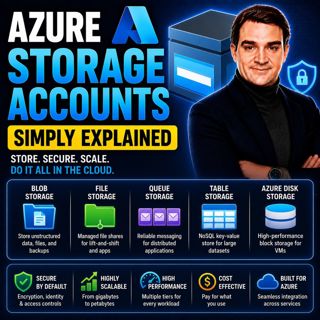
Azure Storage Accounts - Simply Explained

Azure Storage Accounts - Simply Explained

An Azure Storage Account is the foundation of Microsoft's cloud storage platform and acts as a single container that brings together multiple storage services under one roof. Rather than creating sepa...

18 Juli 13min

Azure DDoS Protection - Simply Explained

Azure DDoS Protection - Simply Explained

Azure DDoS Protection is Microsoft's managed service for defending internet-facing applications against Distributed Denial-of-Service (DDoS) attacks. These attacks attempt to overwhelm websites, APIs,...

18 Juli 16min

Azure Network Security Groups - Simply Explained

Azure Network Security Groups - Simply Explained

Azure DDoS Protection is Microsoft's managed service for defending internet-facing applications against Distributed Denial-of-Service (DDoS) attacks. These attacks attempt to overwhelm websites, APIs,...

18 Juli 14min

Azure Virtual Network - Simply Explained

Azure Virtual Network - Simply Explained

An Azure Virtual Network (VNet) is your own private network inside Microsoft Azure. It provides the secure foundation for virtually every cloud workload you deploy, including virtual machines, databas...

18 Juli 17min

Azure Private Link - Simply Explained

Azure Private Link - Simply Explained

Azure Private Link is Microsoft's networking service that enables secure, private connectivity between your Azure Virtual Network and Azure Platform-as-a-Service (PaaS) resources such as Azure Storage...

18 Juli 16min

Azure Traffic Manager - Simply Explained

Azure Traffic Manager - Simply Explained

Azure Traffic Manager is Microsoft's global DNS-based traffic distribution service that directs users to the most appropriate application endpoint anywhere in the world. Instead of sending every user ...

18 Juli 16min

Azure DNS - Simply Explained

Azure DNS - Simply Explained

Azure DNS is Microsoft's fully managed Domain Name System (DNS) hosting service that translates human-friendly domain names like contoso.com into the IP addresses computers use to communicate. Instead...

18 Juli 15min
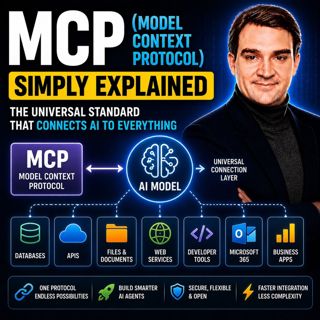
MCP (Model Context Protocol) - Simply Explained

MCP (Model Context Protocol) - Simply Explained

The Model Context Protocol (MCP) is an open standard that allows AI models to securely connect to external tools, applications, and data sources using a single, consistent protocol. Before MCP, every ...

17 Juli 15min

Populärt inom Politik & nyheter

aftonbladet-krim
svenska-fall
p3-krim
rss-krimstad
tv4-nyheterna-story
aftonbladet-daily
flashback-forever
de-fyras-gang
mannen-utan-spar
motiv
rss-sanning-konsekvens
rss-vad-fan-hande
spar
rss-aftonbladet-krim
rss-frandfors-horna
rss-krimreportrarna
politiken
olyckan-inifran
rss-flodet
krimmagasinet

















