

Copilot Memory vs Windows Recall: Understanding the Privacy Differences

Copilot Memory vs Windows Recall: Understanding the Privacy Differences

Everyone thinks Copilot Memory is spying on them. They're wrong. The real privacy concern isn't what Memory records—it's what people assume it does. And before you compare it to Recall, you need to understand what each tool actually is and what it isn't.

🔍 SHORT SUMMARY

Copilot Memory and Windows Recall are fundamentally different technologies that solve different problems. This episode breaks down how Copilot Memory actually works, what it stores and doesn't store, how it differs from Recall's screenshot-based approach, the real privacy implications of both tools, and why understanding intent-based memory versus passive recording matters for Microsoft 365 deployment decisions.

🧠 CORE IDEA

Most confusion around Copilot Memory comes from three misconceptions:
• It records everything you do
• It's the same as Windows Recall
• Microsoft controls what gets stored
None of these are true. Memory is an intent-based notepad you actively control. Recall is a passive screenshot system that captures everything. Understanding this difference is critical for security, governance, and user trust.

⚠️ THE REAL PROBLEM

When Copilot Memory launched, people panicked. The name alone triggered surveillance fears. But the actual privacy risk isn't hidden recording—it's assumption and misunderstanding:
• Users think it logs keystrokes
• IT teams think it violates compliance
• Security professionals compare it to screen recording
• Nobody reads what Memory actually does
This creates organizational resistance based on fear, not facts.

📝 WHAT COPILOT MEMORY ACTUALLY IS

Copilot Memory is a user-controlled notepad for your AI assistant. It works through explicit instructions:
1. You tell Copilot to remember something
Example: "Remember I prefer my summaries under 100 words"
2. Copilot stores that preference
It logs the instruction and flashes a "Memory updated" badge
3. You can review and delete memories anytime
Full transparency—you see what's stored
4. Admins can control Memory at the tenant level
IT has full governance over the feature
Memory doesn't run in the background. It only persists when you explicitly tell it to remember something.

📸 WHAT WINDOWS RECALL ACTUALLY IS

Recall is a completely different technology:
• Takes screenshots of your screen every few seconds
• Stores them locally on your device
• Makes them searchable through AI
• Runs passively in the background
• Requires explicit user consent to enable
Recall is not part of Microsoft 365. It's a Windows 11 feature designed for personal productivity—not enterprise deployment.

🔄 THE KEY DIFFERENCES

Copilot Memory:
• Intent-based: You choose what to save
• Cloud-stored: Syncs across devices
• Admin-controllable: IT can disable it
• Selective: Only stores explicit instructions
• Enterprise-ready: Designed for M365 environments

Windows Recall:
• Passive: Captures everything automatically
• Local-only: Stays on your device
• User-controlled: Admins have limited governance
• Comprehensive: Screenshots all activity
• Personal productivity: Not designed for enterprise use
One is a notepad. The other is a time machine.

🛡️ THE PRIVACY QUESTION

Copilot Memory privacy concerns are overblown.

The real risks are:
• Users storing sensitive information without realizing it
• Lack of user education on what Memory does
• Confusion between Memory and Recall

Recall has legitimate privacy concerns:
• Screenshots may capture sensitive data
• Local storage can be accessed if device is compromised
• Users must understand what they're enabling
Both tools require user awareness—but they're not the same privacy challenge.

💼 WHAT THIS MEANS FOR ORGANIZATIONS

If you're deploying Microsoft 365 with Copilot:
• Educate users on what Memory actually does
• Set clear policies on what should and shouldn't be stored
• Use admin controls to disable Memory if it doesn't fit your governance model
• Don't confuse Memory with Recall—they're separate tools

If you're evaluating Recall:
• Understand it's a local, user-controlled feature
• It's not designed for enterprise-wide deployment
• Privacy concerns are valid but solvable through user consent and education

💡 KEY TAKEAWAYS

• Copilot Memory is intent-based, not passive recording
• Windows Recall is screenshot-based time travel
• Memory requires explicit user instructions to store anything
• Recall captures everything but stays local to your device
• The privacy debate confuses two completely different tools
• Admins can control Memory—Recall is user-controlled
• User education is more important than technical restrictions
• Understanding what each tool does prevents panic-driven governance decisions

👥 WHO THIS EPISODE IS FOR

• IT administrators managing Microsoft 365 and Copilot deployments
• Security and compliance teams evaluating AI tool risks
• CIOs and decision-makers setting AI governance policies
• End users confused about what Copilot Memory actually does
• Anyone comparing Copilot Memory and Windows Recall

🎙️ ABOUT THE HOST – MIRKO PETERS

Mirko Peters helps organizations cut through AI hype and understand what tools like Copilot, Memory, and Recall actually do in production environments. He focuses on governance, privacy, and system behavior—translating fear-driven headlines into fact-based deployment decisions.
👉 Privacy isn't about blocking tools. It's about understanding what they actually do.

🎧 FINAL THOUGHT

Copilot Memory and Windows Recall are not the same thing. One is a notepad you control. The other is a screenshot archive. Treating them as the same privacy threat leads to bad policy and user confusion. Understanding the difference leads to smarter governance.

Become a supporter of this podcast: https://www.spreaker.com/podcast/m365-fm-modern-work-security-and-productivity-with-microsoft-365--6704921/support.

Det här avsnittet är hämtat från ett öppet RSS-flöde och publiceras inte av Podme. Det kan innehålla reklam.

Avsnitt(802)

Microsoft Graph Data Connect - Simply Explained

Microsoft Graph Data Connect - Simply Explained

Welcome to another episode of Knowledge Nuggets with Mirko Peters. In this episode, we're exploring Microsoft Graph Data Connect, Microsoft's enterprise-scale solution for extracting large volumes of ...

19 Juli 13min
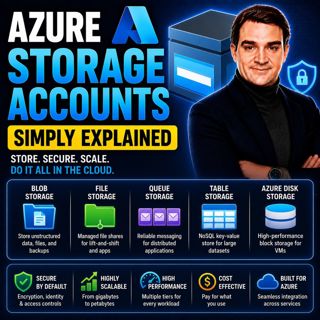
Azure Storage Accounts - Simply Explained

Azure Storage Accounts - Simply Explained

An Azure Storage Account is the foundation of Microsoft's cloud storage platform and acts as a single container that brings together multiple storage services under one roof. Rather than creating sepa...

18 Juli 13min

Azure DDoS Protection - Simply Explained

Azure DDoS Protection - Simply Explained

Azure DDoS Protection is Microsoft's managed service for defending internet-facing applications against Distributed Denial-of-Service (DDoS) attacks. These attacks attempt to overwhelm websites, APIs,...

18 Juli 16min

Azure Network Security Groups - Simply Explained

Azure Network Security Groups - Simply Explained

Azure DDoS Protection is Microsoft's managed service for defending internet-facing applications against Distributed Denial-of-Service (DDoS) attacks. These attacks attempt to overwhelm websites, APIs,...

18 Juli 14min

Azure Virtual Network - Simply Explained

Azure Virtual Network - Simply Explained

An Azure Virtual Network (VNet) is your own private network inside Microsoft Azure. It provides the secure foundation for virtually every cloud workload you deploy, including virtual machines, databas...

18 Juli 17min

Azure Private Link - Simply Explained

Azure Private Link - Simply Explained

Azure Private Link is Microsoft's networking service that enables secure, private connectivity between your Azure Virtual Network and Azure Platform-as-a-Service (PaaS) resources such as Azure Storage...

18 Juli 16min

Azure Traffic Manager - Simply Explained

Azure Traffic Manager - Simply Explained

Azure Traffic Manager is Microsoft's global DNS-based traffic distribution service that directs users to the most appropriate application endpoint anywhere in the world. Instead of sending every user ...

18 Juli 16min
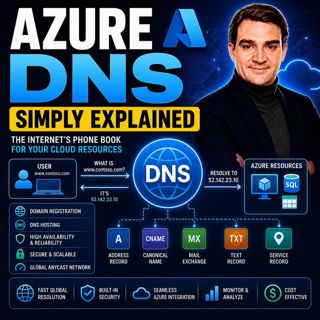
Azure DNS - Simply Explained

Azure DNS - Simply Explained

Azure DNS is Microsoft's fully managed Domain Name System (DNS) hosting service that translates human-friendly domain names like contoso.com into the IP addresses computers use to communicate. Instead...

18 Juli 15min

Populärt inom Politik & nyheter

aftonbladet-krim
svenska-fall
p3-krim
rss-krimstad
tv4-nyheterna-story
aftonbladet-daily
flashback-forever
de-fyras-gang
rss-sanning-konsekvens
motiv
mannen-utan-spar
rss-vad-fan-hande
rss-krimreportrarna
rss-frandfors-horna
spar
rss-flodet
rss-aftonbladet-krim
politiken
olyckan-inifran
krimmagasinet

















